

Activity › Forums › Astrosoftware › Astro Pixel Processor › Calibration frames with different ISO settings, how to process?
Tagged: APP
- This topic has 43 replies, 6 voices, and was last updated 9 years, 4 months ago by
 Groenewold.
-
AuthorPosts
-
April 30, 2017 at 10:05 #14658
 KeesSchererParticipant
What would need to be “overridden” in your opinion?
Nothing apparently, i forgot that i need to add iso200 Bias frames in addition to the iso1600 bias frames…… (A warning would help though as maybe i am not the only user who forgets about this)
April 30, 2017 at 10:19 #14659 HaverkampParticipant
Excellent @keesscherer,
Yes indeed, the warning about possible sub-optimal calibration is still on the RFC list so I’ll implement this soon now ;-)
April 30, 2017 at 11:09 #14660KeesSchererParticipantI still have a problem. I load the masterbias iso200, the masterbias iso1600, the masterflat iso200 and the bad pixel map. Then i load lightframes iso1600, go to 6) integrate, leave everything at default and press “stack”. The result is a stack where the flat calibration is not done. (PS: Where is that manual?)
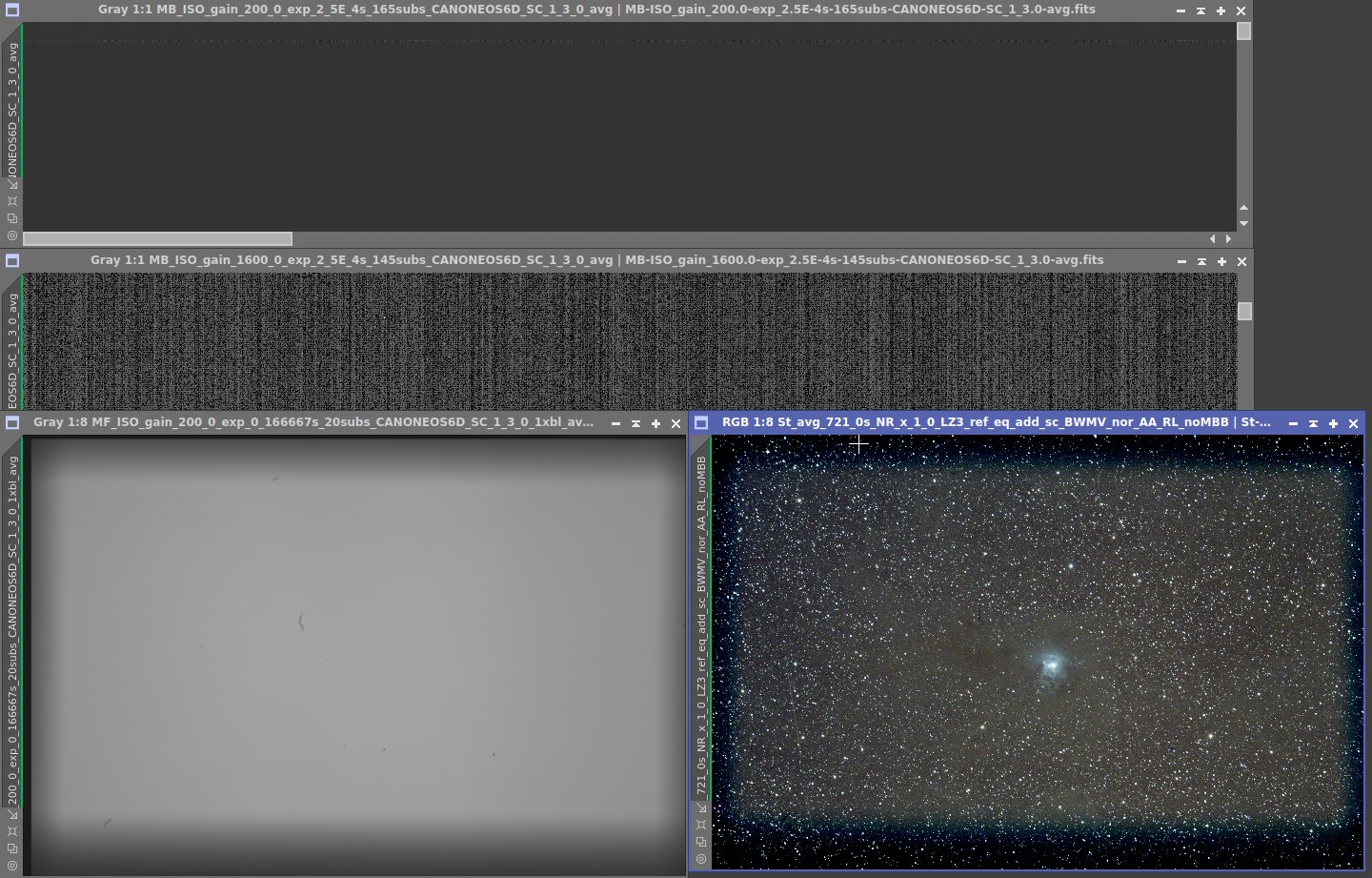
The screenprint shows: top: Masterbias 200iso, Masterbias 1600 iso. left: masterflat iso200, right: resulting stack. (This was using a clip in-L filter)
 April 30, 2017 at 12:39 #14664KeesSchererParticipant
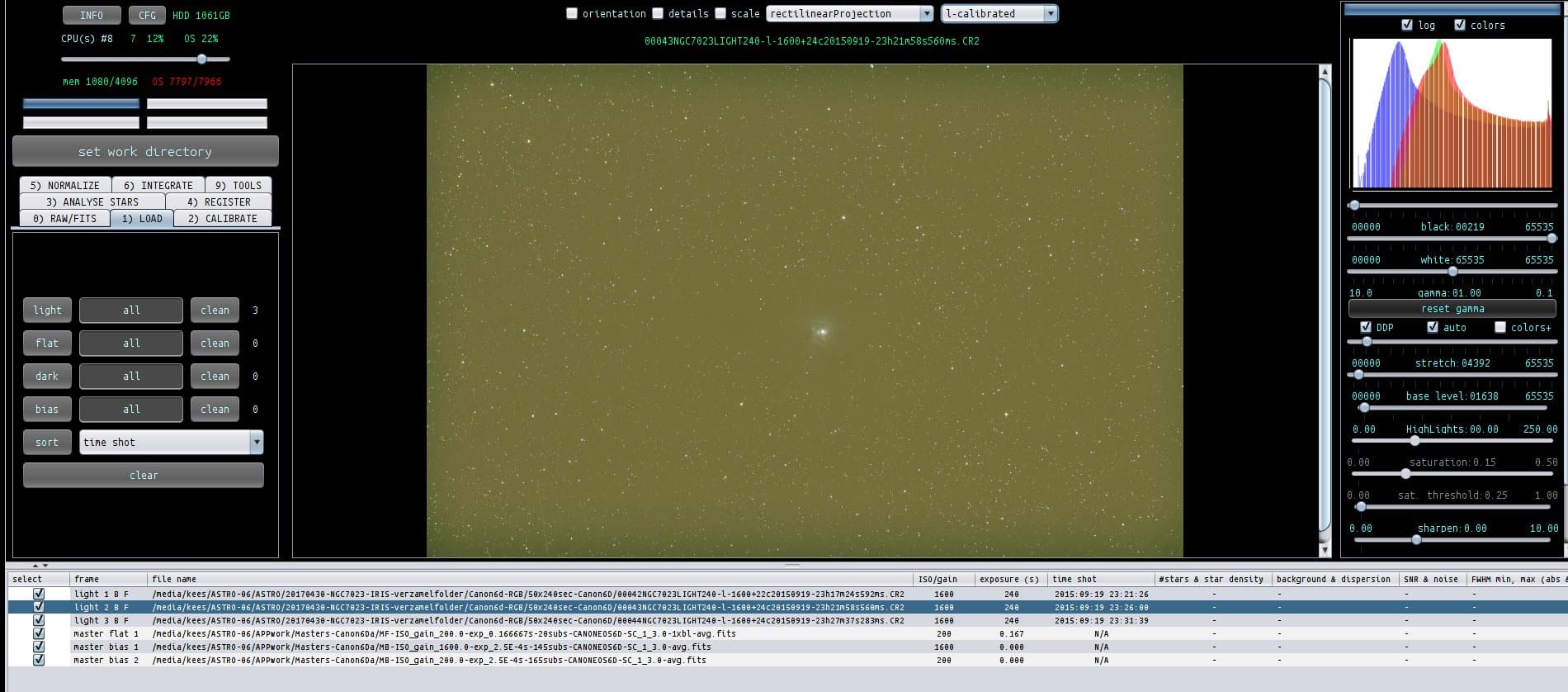
And here you can see that 3 lightframes have “B” and “F”, indicating flat calibration should have been done, but it isn’t……
 April 30, 2017 at 21:08 #14669HaverkampParticipant
Dear @keesscherer, you will need to create the masterflat out of bias calibrated flats.
Loading a masterbias and masterflat will not cause the master flat to be bias calibrated and it shouldn’t.
All individual flats need to be bias calibrated when you create the masterflat. So all flats need to have a b in the frame column before you create the masterflat.
I’ll be happy to demonstrate it if it’s needed?
Mabula
April 30, 2017 at 21:58 #14680KeesSchererParticipantAll individual flats need to be bias calibrated when you create the masterflat. So all flats need to have a b in the frame column before you create the masterflat. I’ll be happy to demonstrate it if it’s needed? Mabula
No, you don’t need to do that Mabula, i will just wait for the manual before i will use APP for DSLR images. At This point in time APP just swallows everything i throw at it and stacks without any warning or guideline.
April 30, 2017 at 22:31 #14691HaverkampParticipantin my first reaction to @mauricetoet’s question in this post I explained everything I think. As everyone could see, Maurice was able to perfectly calibrate his f/2.8 DSLR data with flat & light frames which had different iso values. Off course, his data is much more sensitive to a possible bad calibration with his fast focal ratio.
I offer you to demonstrate it on your data, it’s no trouble. I can even make a movie of it if you wish?
I would only need 2 bias frames of iso 1600 & iso 200, 2 flat frames, and 1 light frame to show you how it’s correctly done.
It really isn’t very complicated and it is done in a couple of minutes time.
April 30, 2017 at 22:32 #14692KeesSchererParticipantI will wait for the manual.
April 30, 2017 at 22:43 #14693HaverkampParticipantWhy can’t we test this quickly and why won’t you let me help you?
Or better, what is unclear to you in my first post in this thread?
Maybe I need to write things down differently. I need to know this, because otherwise, the manual won’t help you as well I think. This would be a shame, since APP can perfectly perform all known calibration paths that are known.
May 1, 2017 at 08:41 #14694KeesSchererParticipantWhy can’t we test this quickly and why won’t you let me help you?
Because you don’t need to, i know what the problem is. My point is that the program has a built in indication next to the lights “B”, “F” but that indication has no meaning when you load all masters and lights. Furthermore there is no check done by APP for this so it just starts to stack. There needs to be a diagnostics step that tells the user what is wrong at this point. And there needs to be a short, clear workflow with just the steps for calibration of DSLR images with flats taken at a different iso setting.
A suggestion from me that will save you a lot of headaches in the future is to (And this is as we say in the Netherlands “Cursing in Church”) Add the following checkmark/option: “Calibrate flats with same (ISO/Gain) bias as Lights”
May 1, 2017 at 10:54 #14700HaverkampParticipant@keesscherer, thank you for your explanation and suggestions ?
Firstly.
” There needs to be a diagnostics step that tells the user what is wrong at this point. And there needs to be a short, clear workflow with just the steps for calibration of DSLR images with flats taken at a different iso setting. ”
I totally agree with you, i’ll work on that in the manual, instruction videos and I will put warnings in APP in the calibration process, to directly help the user to get optimal calibration.
“My point is that the program has a built in indication next to the lights “B”, “F” but that indication has no meaning when you load all masters and lights. Furthermore there is no check done by APP for this so it just starts to stack.”
This assumption is not correct, let me try to explain.
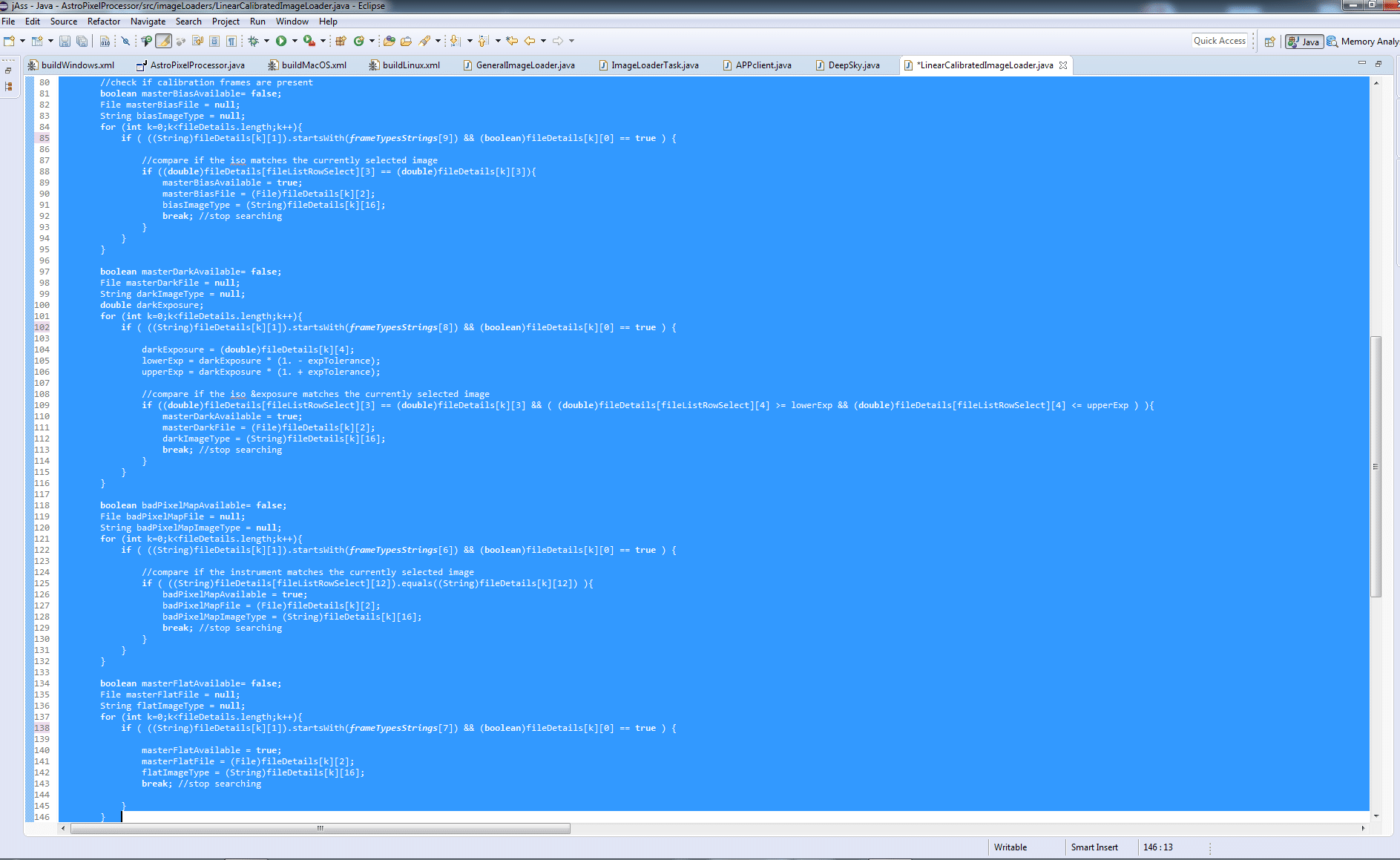
Everywhere in APP where frames are calibrated these checks are done thoroughly, see screenshot 1 for the calibration code of finding and applying the masters (bias, dark, flat, BPM) to a light.
In a previous post, you mention the flat calibration is not done, although the F mark is visible. This assumption is not correct as well. I can assure you that the flat calibration is done, but with a badly prepared master flat. If you put bad master frames into APP it will never automatically adjust it. Nor would pixinsight or nebulosity or any other program. There simply isn’t any information present to detect if the master frame is badly prepared and neither is there information present to “know” how to magically correct this.
Therefor your suggestion to create built-in warnings in het calibration engine while preparing the master frames is a very good idea which I’ll definitely try to implement.
Lastly,
“A suggestion from me that will save you a lot of headaches in the future is to (And this is as we say in the Netherlands “Cursing in Church”) Add the following checkmark/option: “Calibrate flats with same (ISO/Gain) bias as Lights”
I think that your suggestion is to make something that is fundamentally wrong. Let me try to explain:
If you have
light frames of iso1600 and
a masterbias of iso1600.
and flat frames of iso 200
And you would apply the iso1600 masterbias on the iso200 flats, the read noise patterns in your flats are going to be strongly overcorrected wih a factor of 8, which is clearly something you don’t want to do.
(And I really think that you have been doing this consistently in your calibration routine in PI, for which PI didn’t issue warnings to you ? or did it ?)
( the ADU count of a pixel with iso1600 is roughly 8 times the ADU count of that pixel with iso200 for the some number of electrons, e-, that were freed by the received photons that were captured by the pixel.)
You might think, why not use that factor 8 as a correction factor? Well this could only give robust and reliable results if all camera’s behave perfectly linear with respect to change in iso or gain. This is hardly the case, so this correction will never give reliable, robust or optimal results. Therefor, I will not implement this since it is bad practice.
Other applications do let the user do this and this leads to a lot of photographers having sub optimal calibration results without them even knowing it, which really isn’t my goal to achieve with APP.
 May 1, 2017 at 11:14 #14703
 GroenewoldParticipant
Oehhh programming code, I love that. :)
May 1, 2017 at 11:58 #14704GroenewoldParticipantSorry; English. :)
I think it’s excellent to implement this in the correct manner and luckily I did it like that in the past as well. But it will prevent a lot of DSLR users, who did it in the wrong way, from processing old data right? The flat calibration is done, but visually it seems it isn’t. That creates the confusion, I had something similar in a different situation. So looking forward for very clear warnings. So in the end these people just have to use PI or something to use the old flats then, which is fine by me, but I can imagine it can create some disappointment for others. So maybe doing it the PI way with HUGE warnings and telling people they should change their workflow in the future might be a good thing for a first version? I however totally get you don’t want to get into a slippery slope. ;)
May 1, 2017 at 13:01 #14707HaverkampParticipant” But it will prevent a lot of DSLR users, who did it in the wrong way, from processing old data right?”
No completely wrong I am afraid…
Calibrating old data is perfectly fine and possible in APP, why wouldn’t it be?
I am even calibrating old data from 2013 from Scott, @srosenfraz, which was sub-optimal calibrated with Images Plus. (Scott and I are working on a big project) So Scott and I decided to do it all over again which is working perfectly ? and we now have the benefit that Scott’s calibrated files are debayered with Adaptive Airy Disc instead of VNG which is much better for his DSLR RGB data. Scott has confirmed this to me as well.
“The flat calibration is done, but visually it seems it isn’t.”
That is because the master flat was created out of flats which were not bias calibrated. Then you will always see that the flat correction isn’t working as it should.
” So in the end these people just have to use PI or something to use the old flats then, which is fine by me, but I can imagine it can create some disappointment for others. ”
No, you are making invalid assumptioms here again I am afraid. Why would a program be able to calibrate rectenly created files perfectly but not files of an older age. That doesn’t make sense at all I think.
Like I said, APP can perfectly calibrated all known calibration paths, also on data that is ancient, as long as the right calibration files are supplied.
” So maybe doing it the PI way with HUGE warnings and telling people they should change their workflow in the future might be a good thing for a first version? I however totally get you don’t want to get into a slippery slope. ”
No, since this is simply not necessary.
It is quite clear that the principles of data calibration are hard to grasp and I will defintitely try to explain this thoroughly in APP’s manual and in warnings during the creation of the master frames.
Data calibration is a very important step in your data processing and I will not implement solutions that will give the user suboptimal results for the sake of simpler user experience. To me, that would be really dissapointing in such a scientific application…
May 1, 2017 at 13:09 #14710GroenewoldParticipantDeleted, I should’ve realised you just need to create new bias frames. Carry on. :)
-
AuthorPosts
- You must be logged in to reply to this topic.