

Activity › Forums › Astrosoftware › Astro Pixel Processor › Question regarding greencast
- This topic has 2 replies, 2 voices, and was last updated 9 years, 6 months ago by
Theunissen.

-
AuthorPosts
-
March 17, 2017 at 23:39 #12728
Theunissen
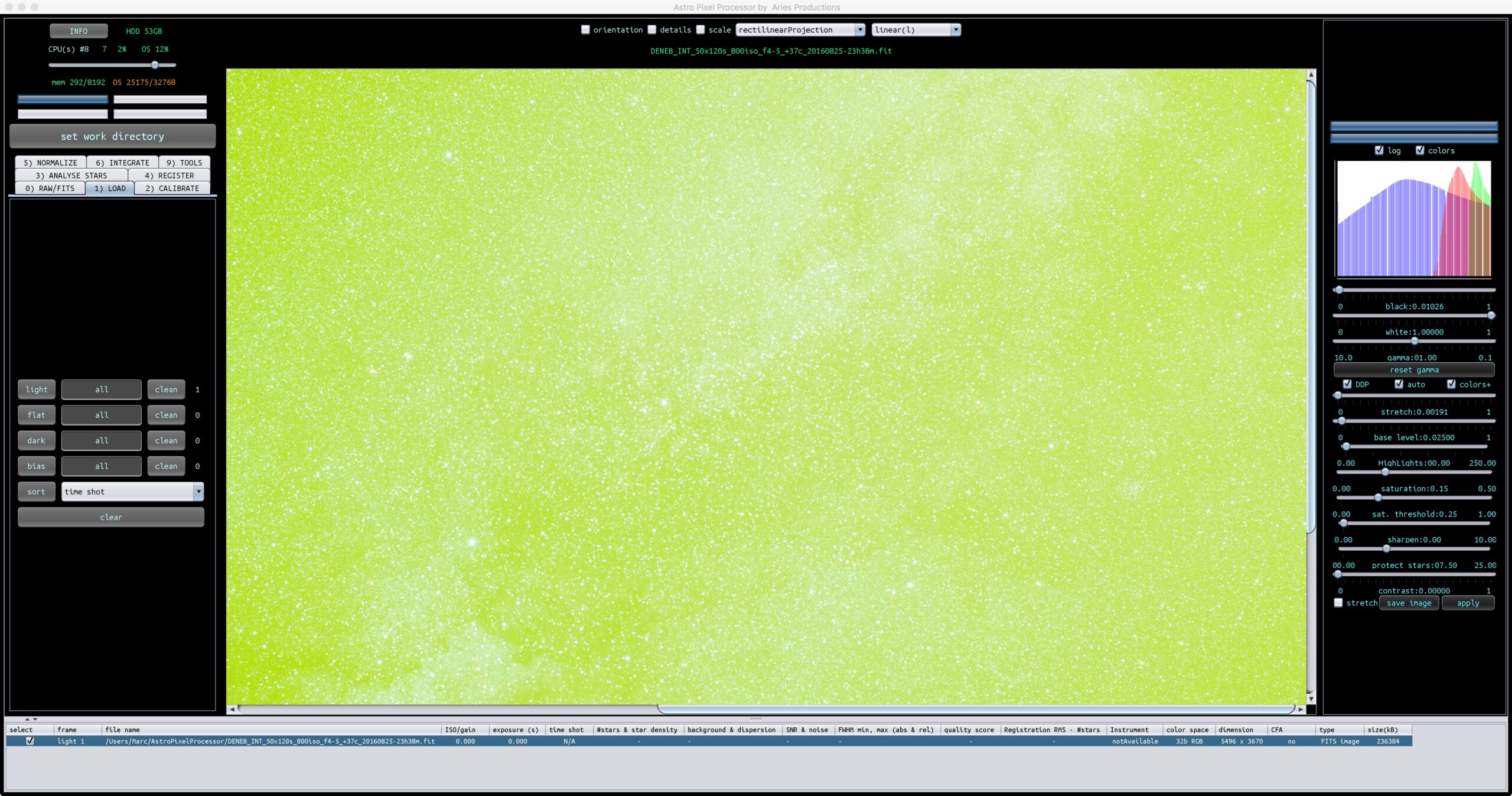
ParticipantHey Mabula, is it possible after stacking to unlink the RGB channels (in the viewer/viewport) in preparation for further processing (with the 9) Tools).
 March 18, 2017 at 09:51 #12751
 HaverkampParticipant
Marc, Unlinking like in unlinked stretch is bad practise I think if you want to have good control over your star colours.
In this case your camera simply sees the night sky as green, so this is not a green cast in your data. If you correct the data for LP and calibrate the background, and you still see a green cast in the background, then you have what people call a green cast. So I would say that the screenshot you post is not green cast, this is just a green sky.
If you run this image in the mentioned LP correction, you’ll immediately see that the tool will neutralize your background, so you can do an efficient LP correction and background calibration ( or vignette correction or background calibration). Once you have set the area selectboxes, and have clicked on calculate, your image will be background calibrated as well, as shown in het image viewer. The calibration is then done, on basis of the sample points that you have provided with the area select boxes. Please note however… that after LP correction, you’ll still need to do the actual Background Calibration. In the future I plan to incorporate this in LP correction to apply the background calibration immediately as a default option.
If you do a unlinked stretch, star colors get ruined. APP will always neutralize/calibrate your background by adjusting multipllicatively on your linear data ? (So colors should be adusted on linear data not by applying different stretches on different channels.)
I hope this makes sense?
March 18, 2017 at 12:00 #12798ParticipantMarc, Unlinking like in unlinked stretch is bad practise I think if you want to have good control over your star colours.
Detoxing from PI ? …
If you run this image in the mentioned LP correction, you’ll immediately see that the tool will neutralize your background, so you can do an efficient LP correction and background calibration ( or vignette correction or background calibration). Once you have set the area selectboxes, and have clicked on calculate, your image will be background calibrated as well, as shown in het image viewer.
Indeed, I forgot, I can always adjust my boxes after the first background calibration.
Thanks for your explanation.
-
AuthorPosts

- You must be logged in to reply to this topic.