

Activity › Forums › Astrosoftware › Astro Pixel Processor › Error: java.lang.NegativeArraySizeException
Tagged: APP
- This topic has 29 replies, 2 voices, and was last updated 9 years, 4 months ago by
 Haverkamp.
-
AuthorPosts
-
May 6, 2017 at 13:05 #14993
Wang
ParticipantHi,
I am trying to create a mosaic. After the registration stage, I saw an error message during the image stacking. Please see that attached image.
Unfortunately my experience with APP is still very limited. This is pretty much the first time I use it. I can’t guess what might have caused this.
Cheers,
Wei-Hao
May 6, 2017 at 13:50 #14997 HaverkampParticipant
Hi Wei-Hao (@whwang),
Thank you for sharing this bug.
I suspect something went wrong in the registration of the mosaic. It would be most helpfull if you can share a screenshot showing the file list panel (bottom panel) which shows all analytical results after 5) normalize.
I would be most interested to see the registration RMS values per panel of the mosaic. And the registration settings that you used.
The error indicates that the registered and normalized image needs an negatively sized raster, so that’s why I suspect an error relating to the registration of your data.
If you are willing to share the data or part of it so I can reproduce the error, that would be most helpfull, I can then isolate the cause of this error.
(you can share using
dropbox, I can setup a shared folder to exchange the data
OneDrive
or a service like wetransfer.com)
Cheers,
Mabula
May 6, 2017 at 14:02 #14998HaverkampParticipantPossibly the error is the result of the 6) Integrate, composition setting. Did you leave it at “reference”?
If so, try the integration with the “full” composition mode. Don’t forget to push the apply mode button.
I should let APP use FULL composition by default when the mosaic mode is used in registration, so I’ll add this to my RFC /ToDo list.
The “reference” composition, only shows the field of view of the reference frame in the integration.
The “full” compostion shows the entire field of view, so all pixels of all registered frames are shown.
If you have a panel in the mosaic that doesn’t overlap with the reference, the reference composition could throw this error I suspect.
May 6, 2017 at 15:18 #15002HaverkampParticipantMay 6, 2017 at 17:01 #15015ParticipantThis is the full screenshot when that error happened. The composition mode is indeed set to full. And yes, the mosaic is larger than 120 deg. It’s a 360-deg pano of the Milky Way.
May 6, 2017 at 18:05 #15021HaverkampParticipantGreat, the screenshot gives a lot of usefull information.
First, I see your machine has 16GB of RAM, and APP can only use 2GB at the moment.
If you click on CFG (top left) you can alter the amount of RAM APP can use. For your mosaic, I recommend to increase this to at least 12-14GB. Leave some GBs of RAM for your OS available to prevent swapping. Adust the amount of RAM, click on OK and restart APP. You’ll see in the top left corner at
“mem x/2048” that 2048 has changed, indicating that APP can now use more memory.
Regarding the encountered BUG..
The problem must be that the field of view is bigger than 120 degrees. The data normally is projected rectilinear. This will be problematic with field of views bigger than 120 degrees.
Link with some explanation on different projections:
http://www.cambridgeincolour.com/tutorials/image-projections.htm
The perspective distortion for a field of view that is full-circle (360 degrees) becomes unlimited… this would be the explanation of the error. APP needs to catch the error properly off course, will add this to my RFC/TODO list.
The solution to be able to project the data differently would be to use the “calibrated projective” registration model instead of the “projective” registration model.
I would advise to try the registration again with:
4) register
enable “dynamic distortion correction”
disable “same camera and optics” (PI made the panels, so PI’s registration engine should be considered the camera, which would normally be different for each panel)
use registration mode “mosaic”
registration model “calibrated projective”
Then at 6) integrate
composition full
no LNC and MBB to start with, let’s first try to make sure the registration works, by keeping LNC and MBB disabled, we can then easily spot the registration errors if there are any.
Lanczos 3 with “no under/overshoot” turned on
As a first start, I suggest to reduce the scale of the integration.
The 40 panel mosaic must be huge, so as a first try, reduce the scale to 0,3. If that works, integrate with 0,5 or bigger. If you use 0,3 (up until 0,7) as scale to start with, use Mitchell-Netravali instead of Lanczos, that gives smoother results in downscaling the data.
Finally, but most importantly, set the projection to “equirectangularProjection” instead of “rectilinearProjection”. This is now possible due to the calibrated projective registration model.
– as a sidenote, starting with a 40 panel mosaic as your first APP experience is really ambitious I think (and really nice to try as well off course) ? !
Judging the information in the file list panel, APP was already able to register all 40 panels within a certain registration error 0,3 – 1,7 pixel. This indicates to me that the registration to start with won’t be perfect (it’s possible that PI’s registration engine is a factor here), but probably pretty good already.
Final suggestion, before starting the registration, you can choose which frame you want to be at the center of the mosaic by selecting that frame as the reference. Maybe you already did in 4) register “set reference”?
I am looking forward to seeing the 40 panel mosaic first result with the “equirectangularProjection” applied. Possibly, your 40 panel mosaic is the biggest field of view yet that has been registered with APP, so this is really testing APP’s current capabilities off course.
Mabula
May 6, 2017 at 19:01 #15034ParticipantHi Mabula,
I will try with your recommended parameters tomorrow. Here are a few additional related and unrelated points.
1. I believe I used equirectangularProjection instead of the standard rectlinearProjection. I might be wrong.
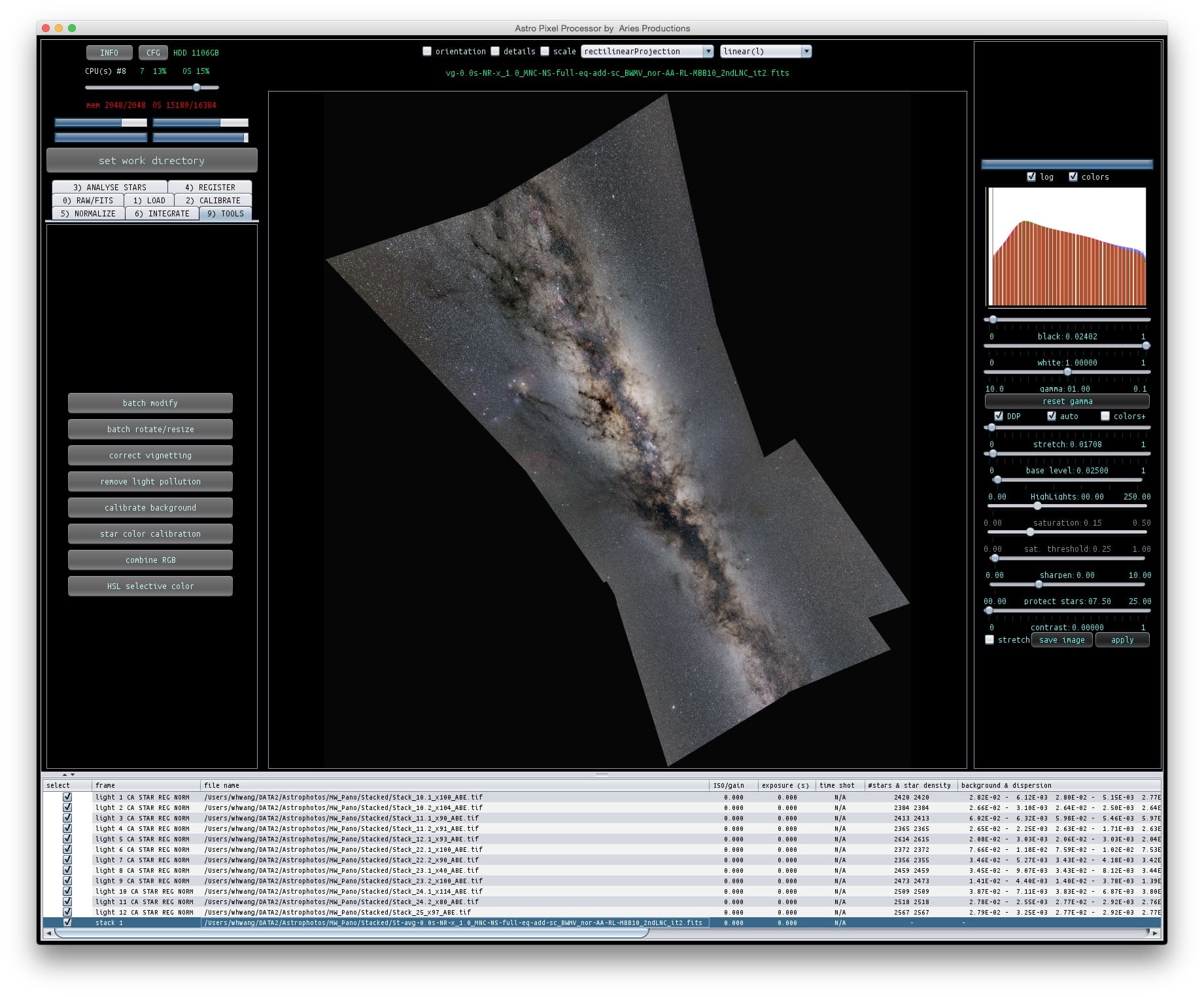
2. I also did try a small subset of the panels to start with. APP can process them successfully. Please see the attached image. Here, my question is whether I can control the orientation of the FOV, to be either horizontal or vertical. The tilted angle like this doesn’t look quite comfortable.
3. I believe what PI did for image stacking is to register every image to the reference frame. If all of the images are taken with identical optics, then the stacked result can be considered as having no distortion correction at all. It should have identical distortion pattern of the reference frame.
4. I have another project to mosaic the 2pi sky. Do you think either of the current two projection methods in APP can do that? When I started the project, I had fisheye projection in mind.
5. It takes couple of minutes for my computer to launch APP. This is more than 10x slower than any other programs I have. Is this normal?
Cheers,
Wei-Hao
 May 7, 2017 at 00:05 #15041HaverkampParticipant
Hi Wei-Hao (@whwang),
“1. I believe I used equirectangularProjection instead of the standard rectlinearProjection. I might be wrong.”
Okay, the equirectangular projection only becomes possible after calibrated projective registration. Let me know if this works tomorrow ;-)
“2. I also did try a small subset of the panels to start with. APP can process them successfully. Please see the attached image. Here, my question is whether I can control the orientation of the FOV, to be either horizontal or vertical. The tilted angle like this doesn’t look quite comfortable.”
Currently, the orientation is the result of the orientation of the chosen reference frame. To control this orientation, I need to do some more programming, but this should be possible. I would scan the borders of the whole mosaic and rotate it in such a manner that either the widest/smallest part will be either horizontally or vertically directed. I think that’s what you are referring to? I can add it to my list as a new feature.
“3. I believe what PI did for image stacking is to register every image to the reference frame. If all of the images are taken with identical optics, then the stacked result can be considered as having no distortion correction at all. It should have identical distortion pattern of the reference frame.”
This is rather complicated. An optical distortion pattern is described by a center of distortion, that is a certain spot on the sensor of your camera and dependent on your optics, like you describe. But if you have made several stacks, theses central points of distortion are definitely not at the same spot in the stacks. So these distortions patterns in the stacks can’t be considered the same, although the data is shot with the same camera. (Technically speaking, PI is the camera now for the stacks that you created, and I am quite convinced that PI doesn’t do correct distortion correction since PI uses thin plate splines for this. Pi doesn’t correct the distortion pattern in your reference frame, the thin plates just bend arbitrarily to the distorted reference. This is a fundamentally wrong approach in my opinion. That’s why I am worried about stacks that were created in PI with Pi’s so called distortion correction. )
“4. I have another project to mosaic the 2pi sky. Do you think either of the current two projection methods in APP can do that? When I started the project, I had fisheye projection in mind.”
The equirectangular projection should be able to do 360 degrees x 180 degrees, the full sphere. Rectilinear is limited to 120 degrees x 120 degrees. A fish-eye projection is something that I can implement as a new feature for sure ;-) Other projection types as well. There are a lot of possibilities. The technical requirement for these other projections is that APP knows the focal lengths and principal points of the frames, which it should know after the calibrated projective registration.
“5. It takes couple of minutes for my computer to launch APP. This is more than 10x slower than any other programs I have. Is this normal?”
No, this is not normal at all, on my windows desktop, and Macbook 2016 it takes just a couple of seconds. The seconds are basically time in which APP connects to the license server using a high degree of TLS encryption, this takes a few seconds for the encryption. It shouldn’t take a couple of minutes. Can you share your OS and hardware specifics? Let me know if it takes a couple of minutes each time that you start APP, then something is not allright..
May 7, 2017 at 06:29 #15045ParticipantFor the orientation, now I can see why the image in the previous screen shot is tilted. Among all the panels, one is tilted relative to the Galactic plane, and that one happened to be picked by APP as the reference.
My OS is MacOS 10.10.5. The machine is a 3.4GHz i7 iMac with 16GB of RAM. The OS and apps are all stored in a 1TB-SSD*2 RAID0 external enclosure through a Thunderbolt2 connection. It’s not the fastest Mac, but still pretty fast especially for launching apps, because of the RAID0 SSD. To be clear, after I launch APP, its icon appears immediately, but it takes 2 to 3 minutes for the processing window to show up. Yesterday when I entered the license for the first time, it also took this long (or even longer) for the license activation. Because it took so long, I almost thought the activation failed.
Finally, will the equirectangular projection project the 2pi sky into a sphere or a rectangle?
Cheers,
Wei-Hao
May 7, 2017 at 13:09 #15055HaverkampParticipantHi Wei-Hao,
“For the orientation, now I can see why the image in the previous screen shot is tilted. Among all the panels, one is tilted relative to the Galactic plane, and that one happened to be picked by APP as the reference.”
Murphy’s Law I guess… ?
“To be clear, after I launch APP, its icon appears immediately, but it takes 2 to 3 minutes for the processing window to show up. ”
Okay, i’ll put it on the RFC list to investigate, i’ll check my server logs as well. Strange behaviour indeed.
“Finally, will the equirectangular projection project the 2pi sky into a sphere or a rectangle?”
The equirectangular projection maps your data in longitude and latitude. Currently the [0,0] coordinate of the projection is the center of the reference frame. So this has some influence on how the projection actually looks.
How the 2pi sky turns out, depends on several things. Is your data a semi-sphere? Or is it a circle on the sphere? In the latter case, possibly a cylindrical projection would be nice.
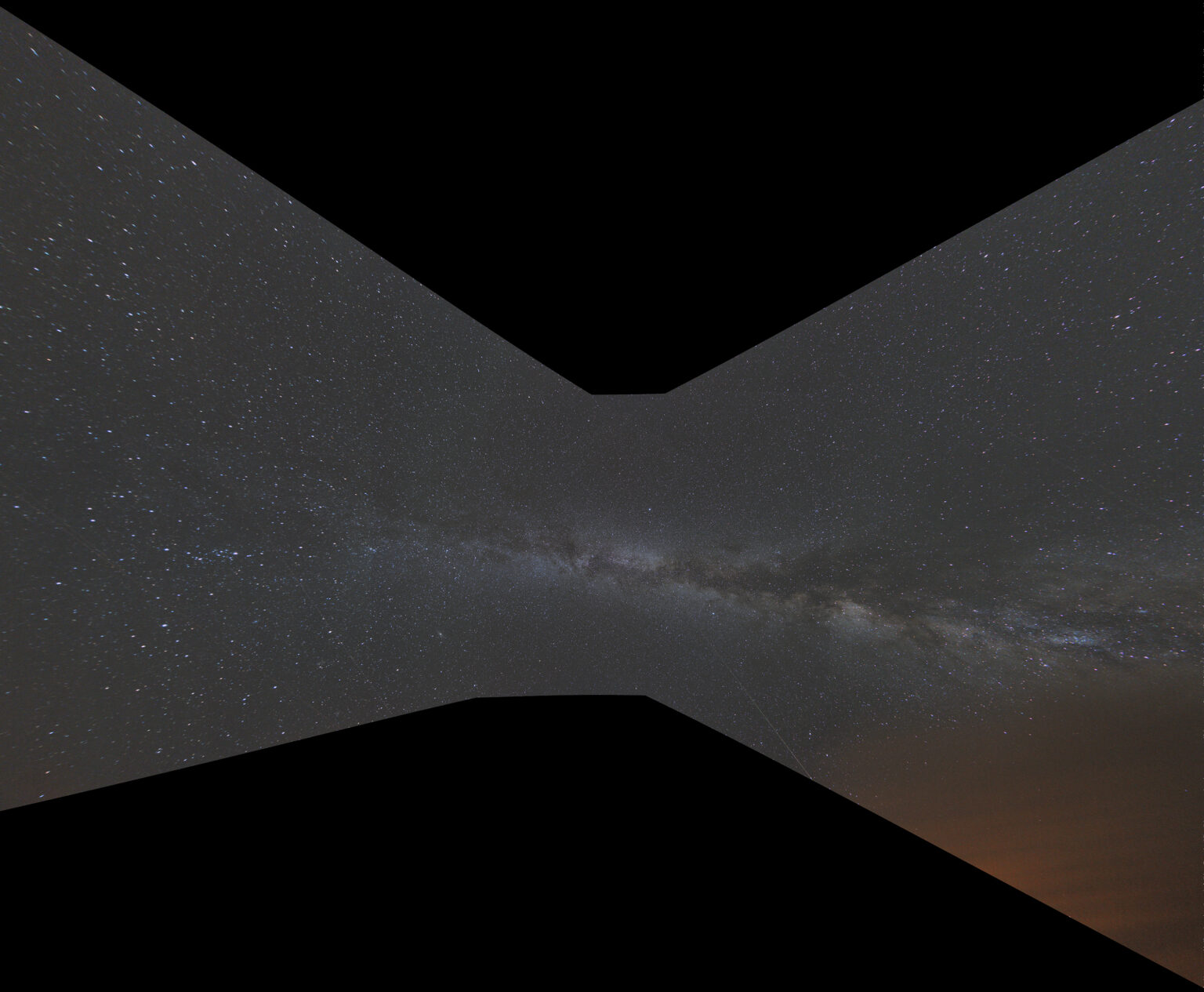
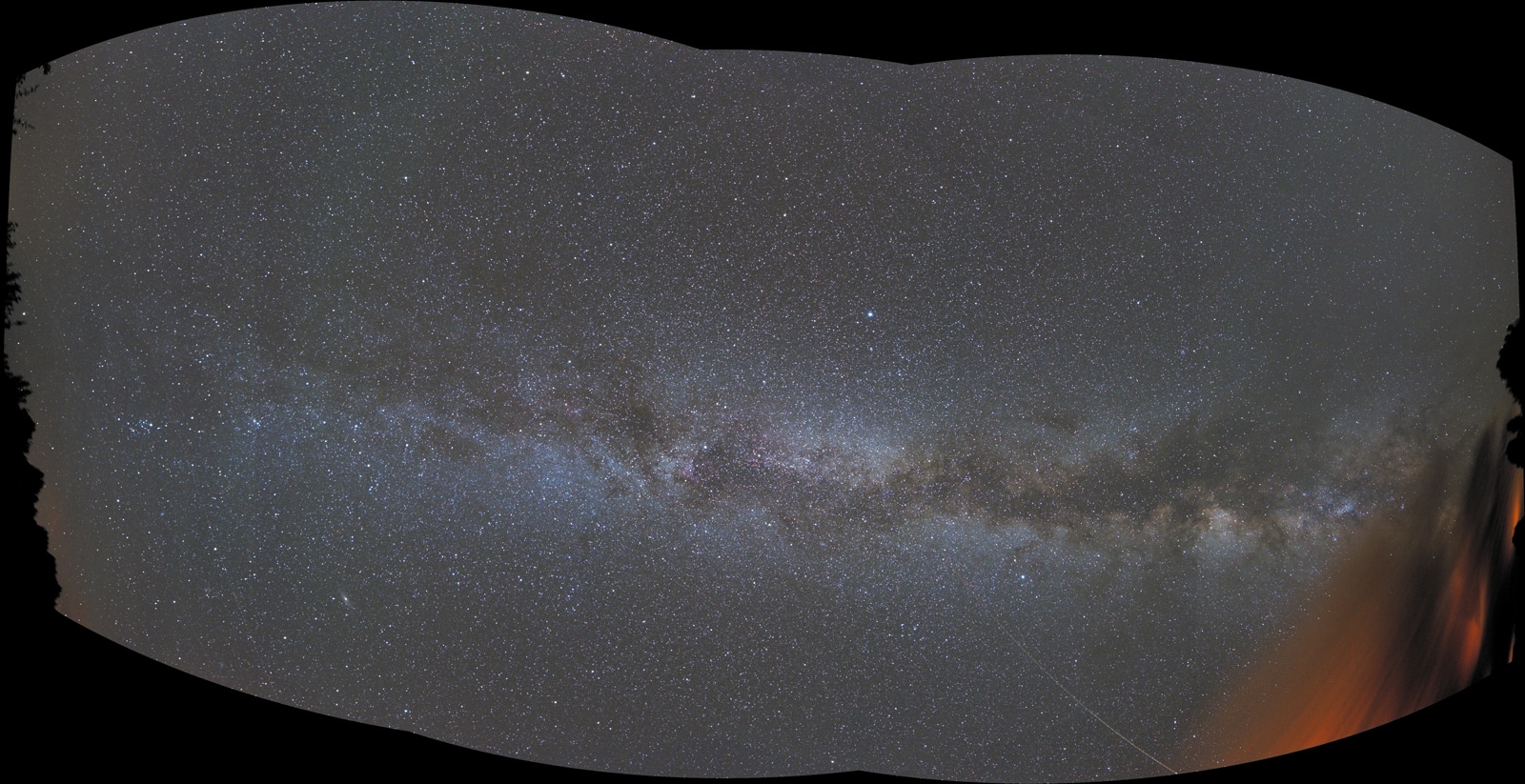
To give you an idea, what will happen with the equirectangular projection versus the rectilinear projection, I show the same image with different projections, field of view is 180 degrees x 60 degrees (give or take) from the northern to southern horizon. Data is courtesy of Ralph Wagter. Canon 6D with a samyang 14mm f/2.8 objective
first image is rectilinear, straight lines stay straight, but perspective distortion is a real problem as you can see.
second image is equirectangular, now the data can easily be projected. A square rectilinear image, becomes more a circle under the equirectangular projection.
Cheers,
Mabula
 May 7, 2017 at 15:01 #15070Participant
Looks like equirectangular is more suitable for a Milky Way pano. I always hate to see a rectilinear projection. The distortion is just too severe.
The 2pi sky pano just cover half of the whole sky, or a hemisphere. Looks to me a fisheye or a stereographic projection would be more suitable.
Another question here. In the normalization page, one can choose to use “add” or “multiply” or “add-scale” or “multiply-scale”. Do you mind explaining their differences? I would think that scaling means multiplication, but it looks like they mean two different things here.
Cheers,
Wei-Hao
May 7, 2017 at 15:56 #15072HaverkampParticipant“Looks like equirectangular is more suitable for a Milky Way pano. I always hate to see a rectilinear projection. The distortion is just too severe.”
Indeed once the field of view becomes larger than 90 degrees, the perspective distortion in the rectilinear projection becomes rather significant.
“The 2pi sky pano just cover half of the whole sky, or a hemisphere. Looks to me a fisheye or a stereographic projection would be more suitable.”
Okay, i’ll put fish-eye and stereographic projections on my RFC list ;-) to add to the possible projections.
“Another question here. In the normalization page, one can choose to use “add” or “multiply” or “add-scale” or “multiply-scale”. Do you mind explaining their differences? I would think that scaling means multiplication, but it looks like they mean two different things here.”
Yes, normalization can be done for lokation and scale/dispersion of the data.
“add” or “multiply” only normalize the lokation of the data. (additively or multiplicatively)
“add-scale” or “multiply-scale” normalize for both lokation and scale/dispersion.
And yes, the normalization of the scale/dispersion is always done multiplicatively, and relative to the found lokation value.
Cheers,
Mabula
May 7, 2017 at 16:38 #15076ParticipantI am still a bit confused by the difference between add-scale and multiply-scale. Let’s say the images were taken under different sky brightness (strong light pollution and less light pollution). So obviously there is a need for an additive term. Also, for some reason, the images were taken with different ISO. So a multiplicative term is also needed. In that case, which is the proper option to use?
Cheers,
Wei-Hao
May 7, 2017 at 18:22 #15082HaverkampParticipantHi @whwang,
No problem,
” Let’s say the images were taken under different sky brightness (strong light pollution and less light pollution). So obviously there is a need for an additive term. ”
The additive term is for differences in sky background between your lights indeed due to additive terms like differences in light pollution indeed. But also for the ever changing sky brightness during the night.
In most cases, the add + scale is the preferred option.
“Also, for some reason, the images were taken with different ISO. So a multiplicative term is also needed. In that case, which is the proper option to use?”
This is a very good question. We still want to correct the light pollution and changing sky brigthness additively, but to account for different iso (or gain) me need multiplicative correction as well to normalize the lokation value of the data.
I think the best way to approach this is to use the method which is applicable for the factor which influence is the biggest.
For instance:
we have ISO400 and ISO800 light frames with equal exposure.
The multiplier between these frames would normally be 2 for the ISO800 data relative to the IS400 data.
If the additive terms in the data, like light pollution diffferences, are less than this factor, use the multiplicative normalization for the lokation. So use multiply + scale.
Would you agree, possibly there are other arguments to choose between additive or multiplicative normalization for the lokation?
Possibly you know of a better way to handle this?
Mabula
May 7, 2017 at 18:30 #15084ParticipantIdeally, we will need both additive and multiplicative. As you mentioned, the sky brightness can change with time during the night. So an additive term is needed. At the same time, a multiplicative term is also needed to account for the change in sky transparency, even if the photographer did not mix different ISO. And of course, in addition to mixing different ISO, it is also common for people to mix images of different exposure time. In this case, a multiplicative factor is also needed. So if at all possible, please consider an option that allows both an additive term and a multiplicative term.
-
AuthorPosts

- You must be logged in to reply to this topic.