

Activity › Forums › Astrosoftware › Astro Pixel Processor › Error: java.lang.NegativeArraySizeException
Tagged: APP
- This topic has 29 replies, 2 voices, and was last updated 9 years, 4 months ago by
 Haverkamp.
-
AuthorPosts
-
May 7, 2017 at 18:50 #15085
 HaverkampParticipant
Hi @whwang,
Excellent, transparancy is indeed a multiplicative factor which plays its part.
Creating a normalization method which uses both additive and multiplicative terms for the lokation can be made, but my question would then be:
How to determine which part should be multiplicatively and which part additively. If we have different ISO or gain, I can simply adjust for that internally, but the differences in Light Pollution and or transparancy should be guessed somehow? Are you aware of software that actually does this adequately?
Any reference to any article that discusses these topics would be most welcome ;-)
May 7, 2017 at 19:15 #15086Wang
ParticipantLooks like Registar can deal with both additive and multiplicative terms simultaneously. Unfortunately I have no idea how that was achieved. It can even handle images that are not linear. (It was produced during the film era.) So it may be doing more than simple multiplicative+additive calculations.
In my own data processing for large telescopes, I first subtract the background in all mosaic panels and make the background zero in all panels. This handles the additive term. Then I conduct aperture photometry on stars in the panels, and use the common stars in the overlapping region to adjust the brightness of the panels. This handles the multiplicative term. Unfortunately, this only works on images with primarily point-like objects and with images that are very well flattened. Amateur images are usually not like this, unfortunately.
In my naive imagination, one may try to use the histograms in the overlapping region between two panels, and match both the central locations and the widths of the histograms. The match of the central location is an additive term, and the match of the width is a multiplicative term. For this to work very well, the panels have to be well calibrated and linear. Noise may add to the width of the histogram, and it can confuse this process.
If you don’t mind sharing the method for the current multiplicative and additive adjustments in APP, I may be able to suggest a method or two that can do both simultaneously.
Cheers,
Wei-Hao
May 8, 2017 at 05:28 #15092ParticipantMore to report.
This time I used a different computer and allocated 80 GB of RAM to APP. It still shows an out of memory error. What’s funny is that I once successfully stitched all the panels together using a computer with just 16 GB of RAM. Then I couldn’t reproduce the success on the same computer and on the more RAM-rich computer: always out of memory. I believe the options I picked are different in different trials, but I can’t tell which option leads to the out of memory error.
Another potential bug. On this computer, I closed APP after the out of memory error. Then I launched it again. The RAM assigned to APP went back to 1 GB automatically, instead of 80 GB. This happened once on my other computer yesterday. It will be nice to force this setting unchanged every time, unless the users changes it.
Feature request: it will be nice if the “set work directory” button remembers the work directory from last time. At this moment, it goes to the home directory every time I launch APP and click the “set work directory” button. It will be much more convenient if it stays where it was. Even if we want to use a different work directory every time, going from where it was will still be faster than going from home, since astronomical files tend to sit in a more confined region in a big computer.
Finally, the launching time of APP on this second computer is just a few seconds, many many times faster than on the other computer. However, this computer is not faster than the previously one. It has more cores and much more RAM, but these shouldn’t affect how fast an app launches.
Cheers,
Wei-Hao
May 8, 2017 at 05:43 #15094ParticipantA new kind of error message pops up. This time I tried to mosaic a subset of panels to see if I can avoid the out of memory error. Then I saw this new error message soon after I initiated the stacking procedure.
May 8, 2017 at 12:35 #15100HaverkampParticipant“In my own data processing for large telescopes, I first subtract the background in all mosaic panels and make the background zero in all panels. This handles the additive term. Then I conduct aperture photometry on stars in the panels, and use the common stars in the overlapping region to adjust the brightness of the panels. This handles the multiplicative term. Unfortunately, this only works on images with primarily point-like objects and with images that are very well flattened. Amateur images are usually not like this, unfortunately.”
Yes, for amateur images this is not feasible. I do understand your workflow.
“In my naive imagination, one may try to use the histograms in the overlapping region between two panels, and match both the central locations and the widths of the histograms. The match of the central location is an additive term, and the match of the width is a multiplicative term. For this to work very well, the panels have to be well calibrated and linear. Noise may add to the width of the histogram, and it can confuse this process.”
Indeed, the data needs to be linear and well calibrated. Noise is an important factor, since dispersion and noise values are correlated. Data that is really flat and well calibrated will have a very high correlation for the dispersion and noise values. If the data is not perfectly flat or has a a lot of structure due to nebulosity then the correlation is much lower in my experience.
In 5) normalize, you’ll notice that I have implemented 2 normalization modes
1) regular
2) advanced
The regular normalization mode, calculates lokation and dispersion values for the whole frame. This is the conventional/naive method and probably similar to what other programs do.
The advanced mode actually does what you are proposing in
“In my naive imagination, one may try to use the histograms in the overlapping region between two panels, and match both the central locations and the widths of the histograms. The match of the central location is an additive term, and the match of the width is a multiplicative term.”
For each frame the lokation and dispersion values are calculated on the area that exactly overlaps with it’s reference frame and are compared to the lokation and dispersion values of the same overlap area of the reference frame. So the advanced mode compares the exact same area’s after registration, so the normalization is done on the exact same histograms. It really works well and also works in mosaic mode. In mosaic mode, this means each panel has it’s own reference. This is possible due to the creation of registration paths in the mosaic mode. To be able to correcly compare dispersion in this advanced mode, the registration of the data is done using nearest neighbour interpolation since that actually conserves the noise characteristics of the data.
“If you don’t mind sharing the method for the current multiplicative and additive adjustments in APP, I may be able to suggest a method or two that can do both simultaneously.”
I don’t mind at all, I’ll try to send you the information with the formulas that I use within the next couple of days. Subtracting the lokation(background) and then adjusting for dispersion of the data is what’s happening in APP as well, by the way. So for each frame, it’s lokation is subtracted, then the data is multiplied, so the dispersion of the frame becomes the same as the dispersion of it’s reference. And finally, the reference lokation is added. So the frame and it’s reference will have the same lokation and dispersion afterwards in the overlap areas, which is a much better way to normalize than the regular/naive mode. I have some examples of this in my presentation, did you see those?
May 8, 2017 at 13:25 #15104HaverkampParticipant“It still shows an out of memory error. What’s funny is that I once successfully stitched all the panels together using a computer with just 16 GB of RAM. ”
By looking at the error, I think I know what’s happening. My initial guess would be that:
After registration, APP finds a field of view that is too large too fit into the image structure that I currently use in APP. The limit now is that the amount of pixels of an image can’t exceed 2^31 = 2,147,483,648 = 2 billion pixels. So the image can’t be created. The amount of memory is not the limitation here. You are the first one that triggers this if my guess is correct.
If you are using the calibrated projective registration model and use equirectangular projection in the integration then I am a bit surprised though that this is triggered with your 40 panels mosaic,
With 2 billion pixels being the limit at the moment, this means that for an RGB image of 2 billion pixel in 32bits float format, this image needs a memory allocation of = (2^31) * 4 (8bits bytes to 32bits floats) * 3 (3 channels) = 24GBs of memory..
For stacking or other operations, APP would need this amount times three = 72GBs currently. I set this conservatively at the moment. So the 80GBs of memory should handle such an image I think.
To prevent this error from happening and still being able to create the image within the 2GB limit, I need APP to automatically adjust the scale of the composition so it would fit into the 2GB limitation on the amount of pixels. Then the error is not thrown, the user will get a proper warning and the image would still be created although at a smaller scale. I’ll fix this today.
“Another potential bug. On this computer, I closed APP after the out of memory error. Then I launched it again. The RAM assigned to APP went back to 1 GB automatically, instead of 80 GB. This happened once on my other computer yesterday. It will be nice to force this setting unchanged every time, unless the users changes it.”
This is strange, especially since the default value is 2GB. If the user override isn’t working it should default to 2GB. I know that if you open the CFG menu, it always starts at 1GB, is this what you are seeing? Or do you actually see “mem x / 1024” at the top left after having set the memory at a certain value and a restart of APP?
This setting should be forced indeed, I have tested this on Windows, MacOS en Linux and it works on my systems. I set it once and it always works.
“Feature request: it will be nice if the “set work directory” button remembers the work directory from last time. At this moment, it goes to the home directory every time I launch APP and click the “set work directory” button. It will be much more convenient if it stays where it was. Even if we want to use a different work directory every time, going from where it was will still be faster than going from home, since astronomical files tend to sit in a more confined region in a big computer.”
Will add this to the RFC, is quite usefull indeed.
“Finally, the launching time of APP on this second computer is just a few seconds, many many times faster than on the other computer. However, this computer is not faster than the previously one. It has more cores and much more RAM, but these shouldn’t affect how fast an app launches.”
Yes, I agree, it’s strange behaviour and possibly due to some OS configuration in combination with APP startup parameters. You are the first to report this. I’ll build the next version with slightly different startup parameters to see if it has some influence. I will also investigate if it somehow relates to license verification.
Thank you for your feedback Wei-Hao ?
Mabula
May 8, 2017 at 17:19 #15113HaverkampParticipantHi Wei-Hao (@whwang)
I have added several extra checks for memory or technical limits into APP.
A proper message will pop-up, when image dimensions become infinite or negative, like the error that started this thread.
If your image dimensions after registration become bigger than
1) the amount of memory that can be allocated or
2) the technical limit of the image structure in the code
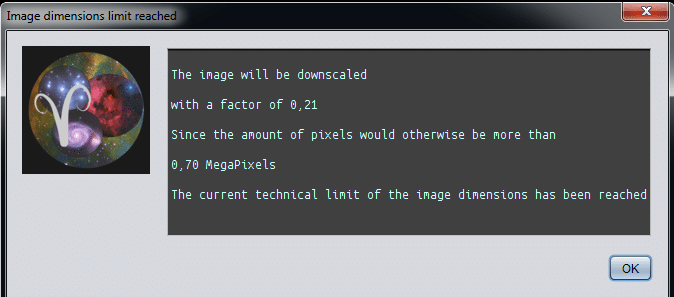
the user will get a warning that the image will be downscaled with a certain factor
and the warning will indicate which limitation was reached.
The downscaling is a measure that although a limit is reached, the image can still be created.
I have been testing this, this afternoon.
With 16GB of memory allocated for APP the limit is a
430MP (MegaPixel) 32bits float RGB image, so a monochrome 32bits image could be 3times this, 1290 MP. This 430MP image has 25000×17000 image dimensions and is 5GBs large.
To make bigger pictures, more memory needs to be allocated to APP.
The technical limit for an image would be triggered when the
– RGB image becomes larger than (2^31) / 3 = 700MP
– monochrome image becomes larger than 2^31 = 2147MP
For 32bits float data, this means that allocating 32GBs of RAM to APP is enough. Allocating 80GBs of RAM won’t accomplish more.
To go beyond the 2 billion pixel limit, I would need to completely rebuild the way APP handles images. This would be something to implement once other more pressing matters are solved off course.
I will compile new versions later today and will inform you once they are ready for download.
(The screenshot shows the warning when a limit is reached, I set the technical limit really low for testing purposes.)
 May 8, 2017 at 17:43 #15116Participant
Hi Mabula,
Thank you. The new system warning should be very useful. 700 MP is already slightly larger than the largest mosaic that I had ever built:
http://www.astrobin.com/250543/?nc=user
Is 32bit floating point the internal data format for APP? Does relaxing it to 16bit floating point allow for 1.4 GP images without significant rebuilt of APP?
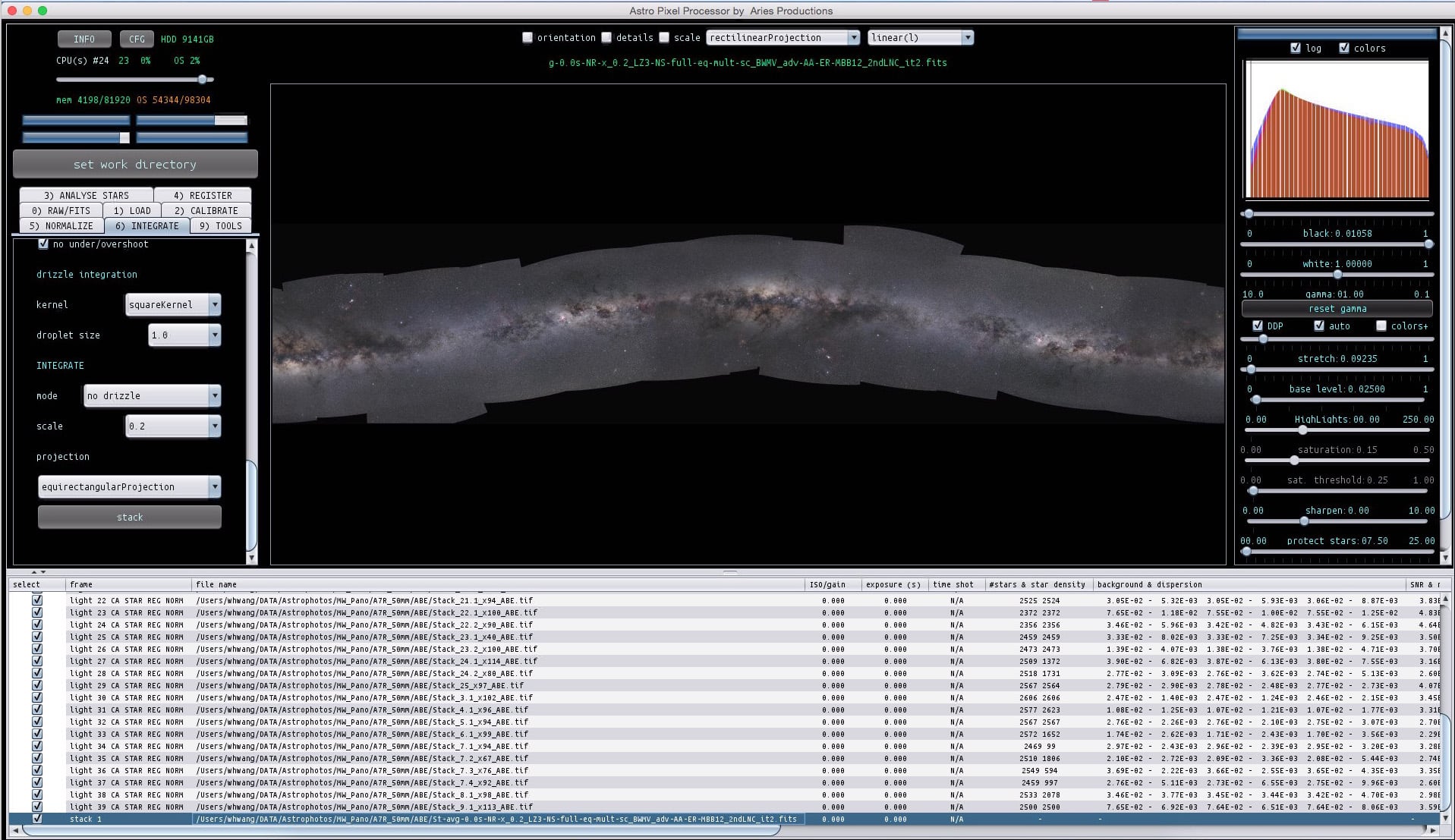
I finally am able to create a full mosaic using all panels without running into troubles. I used a scale of 0.2 to avoid potential errors. The result is attached. You can see that there are still issues:
1. The Milky Way is not straight. I guess this has something to do with who the reference is. Is it possible to make it straight in some way? None of the panels are perfectly at the middle of the Galactic plane. They are either above or below. So it is not possible to pick a reference frame that makes the projection right at the Galactic plane.
2. There are still brightness/contrast differences between the panels. I used multiply-scale for normalization. I can try if it becomes better if add-scale is used, but I guess not. I also used the advanced normalization.
3. The registration is wrong in many ways. As far as I recall, the various parameter I used are, calibrated projection, equirectangular, and dynamic distortion correction. Anything I can do to improve the registration?
Cheers,
Wei-Hao
 May 8, 2017 at 18:54 #15124HaverkampParticipant
H@whwang,
Wow, that already looks pretty impressive ;-) !
“Is 32bit floating point the internal data format for APP? Does relaxing it to 16bit floating point allow for 1.4 GP images without significant rebuilt of APP?”
In image integration APP converts all image data formats to normalized 32bits float data in the range of 0-1. I have implemented this, so you can combine without problems data of 16bit and 32bits, which is most usefull for combining data of different sources. Light integration is done always in 32bits, unless you feed 64bits data into APP, then integration is done in 64bits.
Relaxing it to 16bit for now will not matter. The technical limit is a limit on array dimensions (can’t be larger then 2^31 elements in Java) not on the amount of memory. I will investigate in due time how to overcome this, it should be possible off course, but like I said I’ll have to do some serious rebuilding of some modules. (I first quick search inidicated that there might be s special library which I can use.. which would save me a lot of time)
1) Is it possible to make it straight in some way?
To do it artificially would mean to create a special algorithm for this purpose. I know from literature that in using cylindrical projections, constraints are used to actually solve this. Possibly this could be the solution since a cylindrical projection would suite this dataset I think.
2) There are still brightness/contrast differences between the panels.
Yes I see, as long as the individual mosaic frames aren’t perfectly corrected for any gradients I would think this is to be expected more or less. I see that you have used MBB and LNC. All possible seams are well corrected?
3) The registration is wrong in many ways.
Yes from the Registration RMS that is saw in a previous screenshot I was expecting clear errors to show in the mosaic.
The best way to solve this would mean to start from scratch with individual subs of all panels I think, but that would mean, you have to remake all panels which is a lot of work.
For now, the best thing to try to improve registration is to increase the star count in the star analysis.
Set limit stars to 5000 and lower the
detect above noise level kappa to 4.
And then run registration with
“dynamic distortion correction”
“same camera and optics” try on and off. (If on is worse then off, I strongly suspect the registration engine of PI did more worse than good for your data, so for me this would be important to know)
But probably wait for the new version first before trying. I am actually working in the registration engine now which could also help this dataset ;-)
I’ll give you a signal when you can download it.
Finally, can you send me the result which is shown in your latest screenshot, so I can get a better idea of the size of the registration errors?
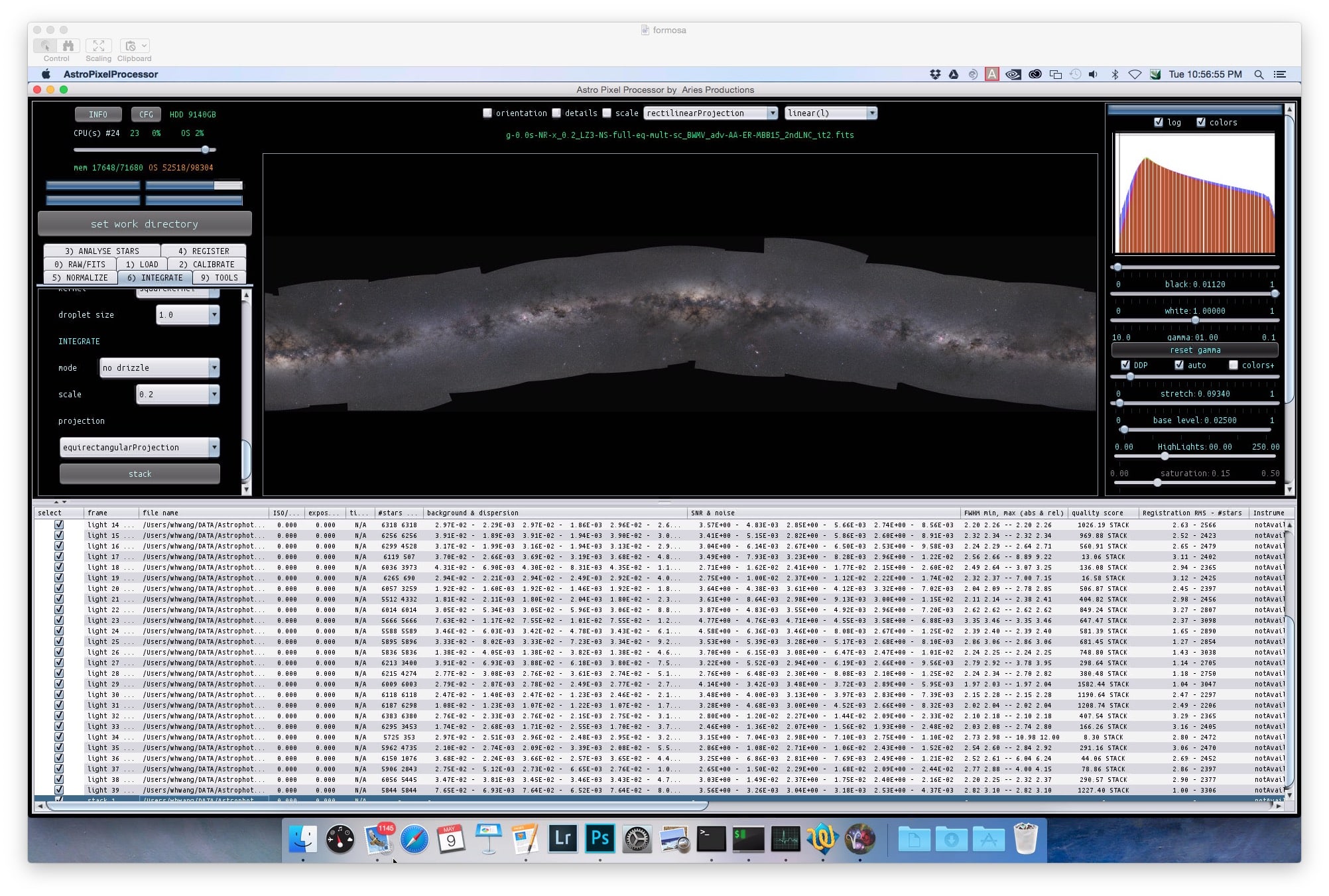
May 9, 2017 at 17:08 #15130ParticipantMore attempt. This time, the brightness/contrast different between panels seem to reduced. I had used the advanced and multiply-scale options for normalization. I am not sure whether this combination of parameters is responsible for the improvement.
On the other hand, the registration is still terribly wrong. I increased the detected stars to more than 6000. Typical registration rms is between 1 and 3 and number of stars is less than half of the detected stars. For registration, I used dynamic distortion correction and calibrated projective, and no same camera and optics.
One thing I might do is to to pick one unstacked raw frame for each panel and feed them to APP. This way, there should be absolutely no additional distortion introduced by the stacking in PixInsight. (I still do not believe PixInsight had introduced any distortion, but it wouldn’t hurt to test and verify this.) Unfortunately this will have to wait for a couple of weeks.
Cheers,
Wei-Hao
 May 10, 2017 at 14:16 #15137HaverkampParticipant
Hi @whwang,
Thank you again for your feedback.
“On the other hand, the registration is still terribly wrong. I increased the detected stars to more than 6000. Typical registration rms is between 1 and 3 and number of stars is less than half of the detected stars. For registration, I used dynamic distortion correction and calibrated projective, and no same camera and optics.”
Yes, I am going to work on the (calibrated) projective mosaic algorithms. I know that especially the calibrated version needs a big upgrade to work well (with your data). I have delayed improving the algorithms until a dataset comes along that can clearly show the limits of the current algorithm. I think your data is calling for an upgrade, so I’ll work on it and I will let you know when you can test it ;-)
The amount of stars that is used in registration depends on the amount of overlap between the frame and it’s reference. So if 2000 stars are registered out of a possible 6000 that are detected in the frames, this would roughly mean that the frame and it’s reference overlap for 2000/6000 = 1/3 or 33%. And I have artificial intelligence (Bayesian inference) in place to expand the initial registration hypothesis to the extreme corners of the area for which the two frames have overlap.
“One thing I might do is to to pick one unstacked raw frame for each panel and feed them to APP. This way, there should be absolutely no additional distortion introduced by the stacking in PixInsight. (I still do not believe PixInsight had introduced any distortion, but it wouldn’t hurt to test and verify this.) Unfortunately this will have to wait for a couple of weeks.”
I haven’t seen your data so I can’t say a lot about any distortion introduced by PI, I only know from experience and testing myself with distortion correction in PI, that it can be a problem. Like I said before, if your panels were integrated without PI’s distortion correction, then we shouldn’t worry about this. And you could get a better result with “same camera and optics” on. If only homographies were used by PI, then the distortion pattern of your data shouldn’t be changed like you indicated as well.
The main problem currently is that the calibrated mosaic algorithm doens’t model the center of distortion yet for the panels. This really needs to be improved to get better results.
I would be very interested to see what happens, if you register only single untouched subs of the panels. The best way to create your mosaic, I think, is to make a distortion model using only individual subs of all 40 panels. Then save this model, and use this model in the creation of the panels. Then the mosaic integration should turn out much better. This is the way I used in for instance the 9 panel of Yves of the Nan to Crescent.
“Unfortunately this will have to wait for a couple of weeks.”
I would advise to wait with further testing until I have had time to improve the algortihms so no problem at all ;-)
May 11, 2017 at 06:47 #15146ParticipantHi Mabula,
Thanks for the reply. It is very fun to try APP and I see lot of potential.
I know that my Milky Way panorama is very challenging. At this moment, no any other programs can go as far as APP has. So even though the results above are not good enough yet, APP has already been far more successful than any other program. It is really wonderful to see this.
Since not many other people will try crazy mosaics like this, I do not think processing such mosaics should be your top priority. You should focus your efforts on other more useful features. At this moment, I am already very happy to recommend APP to my astrophoto friends. They should already find APP a wonderful program: very capable and yet reasonably easy to use.
Below are my suggestions/wish list for APP improvement/enhancement.
High priority:
1. Online help and simple explanation to each option. A full documentation will take time. However, at this stage, even some hint about the options can be useful to people who encounter APP for the first time.
2. warning of very big output file
(Not many high priority items here. As I said, APP is already very good!)
Intermediate Priority:
1. allowing for raw files from Sony, Fuji, and Pentax. (For example, my current workhorse camera is Pentax 645z. It will be nice if I can stack 645z images using APP.)
2. The freedom for users to specify the projection center, to correct for the bended Milky Way problem we saw above.
3. Fisheye, stereograph, cylindrical (or Mercator?) projections
4. both multiplicative and additive at the same time, for image normalization
5. Flat exposures can have separate dark files, as their exposure time can be very different from the light frames.
Low priority
1. capability to handle images a few times larger than 700 MP.
2. To allow to use a wide-field low-resolution image as a registration reference. Such an image can even serve as a reference for sky gradient subtraction and image normalization.
3. Dark optimization. Sometimes darks are taken under slightly different temperature. It will be nice if APP can automatically scale the dark to better match that in the light frames.
Cheers,
Wei-Hao
May 14, 2017 at 20:51 #15209HaverkampParticipantHi @whwang,
“I know that my Milky Way panorama is very challenging. At this moment, no any other programs can go as far as APP has. So even though the results above are not good enough yet, APP has already been far more successful than any other program. It is really wonderful to see this.”
Excellent, thank you very much for all of your compliments ;-), I really appreciate your feedback and suggestions. Let me respond:
“High priority:
1. Online help and simple explanation to each option. A full documentation will take time. However, at this stage, even some hint about the options can be useful to people who encounter APP for the first time.
2. warning of very big output file”
1) Indeed, documentation in APP using tool tips are being implemented and I aim to have these tool tips for all buttons and options to help everyone getting started. I have also started work on a Quick Reference Guide. Which will explain more about requirements, current capabilities of APP and I also aim to include work flows. A full documentation is being written as well, but will take longer. The ToolTips and The Quick Reference Guide are the main priorities, including a good explanation about data calibration workflow including a warning system if the user is following a suboptimal path.
2) Do you refer, to the long file name, or the big file mapping during integration? I guess the later? A direct warning will be in place using the tooltips.
May 14, 2017 at 21:01 #15210HaverkampParticipantContinued:
“Intermediate Priority:
1. allowing for raw files from Sony, Fuji, and Pentax. (For example, my current workhorse camera is Pentax 645z. It will be nice if I can stack 645z images using APP.)”
Indeed, will start work on this soon ;-)
“2. The freedom for users to specify the projection center, to correct for the bended Milky Way problem we saw above.”
Indeed, setting the center would be very nice for big field of views. The bending should be solved with constraints in the multiple view algorithms. We could work on this with your data I think.
“3. Fisheye, stereograph, cylindrical (or Mercator?) projections”
Indeed, Will be own the RFC
“4. both multiplicative and additive at the same time, for image normalization”
Yes, I’ll respond to your separate thread about this.
“5. Flat exposures can have separate dark files, as their exposure time can be very different from the light frames.”
This should be no problem for APP currently. APP finds master darks with the same exposure (within exposure tolerance %) and iso/gain for the lights and or flats. You can load master darks for your flats and lights without problems.
Check this topic started by Maurice, in my first response I explain this in detail.
May 14, 2017 at 21:14 #15212HaverkampParticipant” Low priority
1. capability to handle images a few times larger than 700 MP. ”
Yes, something for the future, but definitely on the list
“2. To allow to use a wide-field low-resolution image as a registration reference. Such an image can even serve as a reference for sky gradient subtraction and image normalization.”
I understand, should be possible. Will add tot the RFC list
“3. Dark optimization. Sometimes darks are taken under slightly different temperature. It will be nice if APP can automatically scale the dark to better match that in the light frames.”
Yes, I have been thinking about this for a long time. Dark scaling is full of potential problems though, since not all signals in darks behave linearly, like we would like them to do, amp glow for instance. So while it would make life easy for the photographer, he could easily have sub-optimal calibration due to the scaling which doesn’t work perfectly. But maybe my concerns can be removed if you or someone else can refer me to good literature on this subject. I would love to implement this as soon as possible if there actually exists a very robust way for all sorts of different sensor technologies that are being used in the amateur and pro market, which I think is very hard to find. How’s your professional experience in this regard?
-
AuthorPosts

- You must be logged in to reply to this topic.