


Forum Replies Created
-
AuthorPosts
-
May 11, 2017 at 06:47 #15146
Wang
ParticipantHi Mabula,
Thanks for the reply. It is very fun to try APP and I see lot of potential.
I know that my Milky Way panorama is very challenging. At this moment, no any other programs can go as far as APP has. So even though the results above are not good enough yet, APP has already been far more successful than any other program. It is really wonderful to see this.
Since not many other people will try crazy mosaics like this, I do not think processing such mosaics should be your top priority. You should focus your efforts on other more useful features. At this moment, I am already very happy to recommend APP to my astrophoto friends. They should already find APP a wonderful program: very capable and yet reasonably easy to use.
Below are my suggestions/wish list for APP improvement/enhancement.
High priority:
1. Online help and simple explanation to each option. A full documentation will take time. However, at this stage, even some hint about the options can be useful to people who encounter APP for the first time.
2. warning of very big output file
(Not many high priority items here. As I said, APP is already very good!)
Intermediate Priority:
1. allowing for raw files from Sony, Fuji, and Pentax. (For example, my current workhorse camera is Pentax 645z. It will be nice if I can stack 645z images using APP.)
2. The freedom for users to specify the projection center, to correct for the bended Milky Way problem we saw above.
3. Fisheye, stereograph, cylindrical (or Mercator?) projections
4. both multiplicative and additive at the same time, for image normalization
5. Flat exposures can have separate dark files, as their exposure time can be very different from the light frames.
Low priority
1. capability to handle images a few times larger than 700 MP.
2. To allow to use a wide-field low-resolution image as a registration reference. Such an image can even serve as a reference for sky gradient subtraction and image normalization.
3. Dark optimization. Sometimes darks are taken under slightly different temperature. It will be nice if APP can automatically scale the dark to better match that in the light frames.
Cheers,
Wei-Hao
May 11, 2017 at 06:16 #15145ParticipantDoes APP automatically send you (or save locally) a crash report every time it is crashed or forced to terminate? It should be useful.
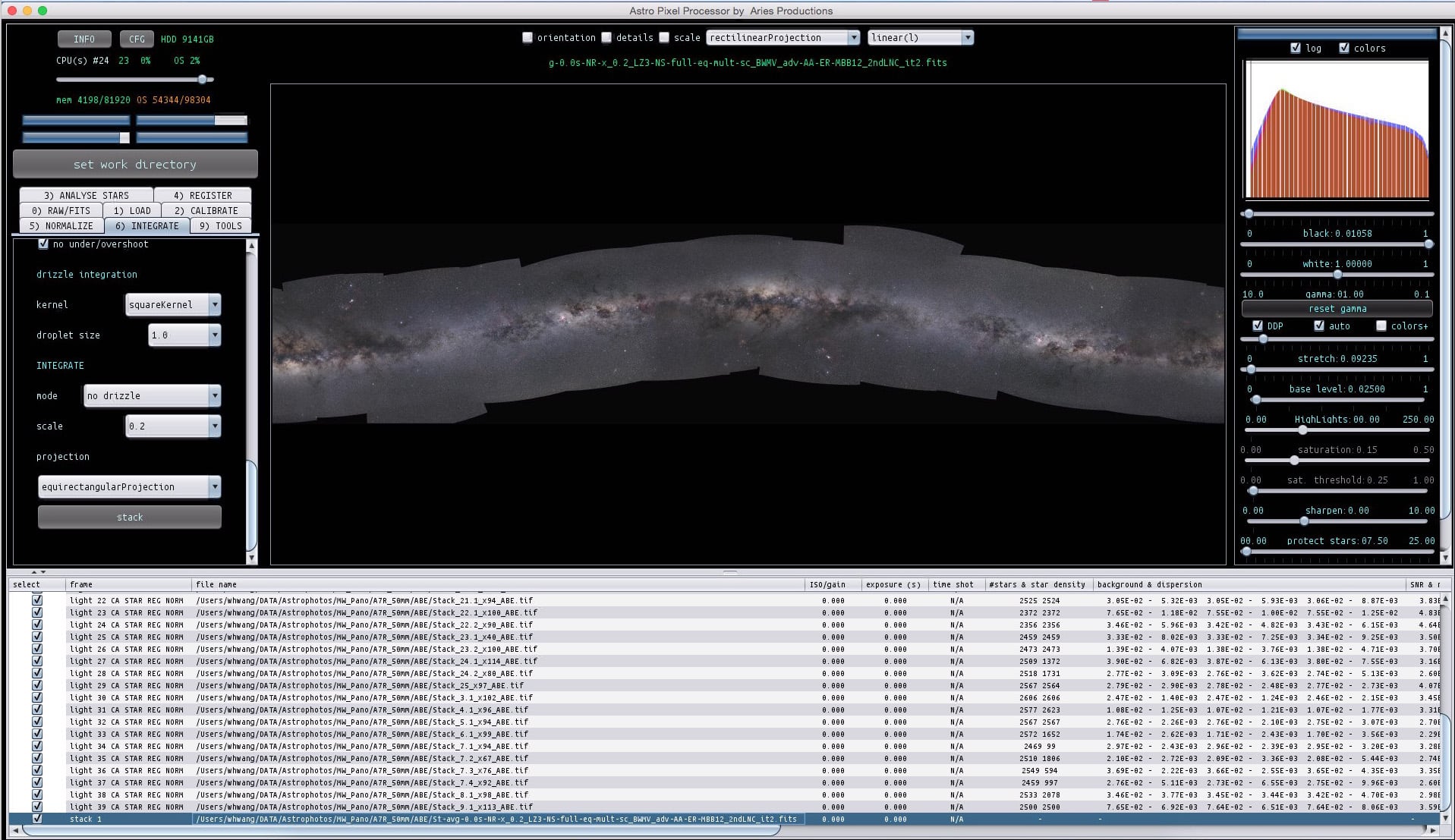
May 9, 2017 at 17:08 #15130ParticipantMore attempt. This time, the brightness/contrast different between panels seem to reduced. I had used the advanced and multiply-scale options for normalization. I am not sure whether this combination of parameters is responsible for the improvement.
On the other hand, the registration is still terribly wrong. I increased the detected stars to more than 6000. Typical registration rms is between 1 and 3 and number of stars is less than half of the detected stars. For registration, I used dynamic distortion correction and calibrated projective, and no same camera and optics.
One thing I might do is to to pick one unstacked raw frame for each panel and feed them to APP. This way, there should be absolutely no additional distortion introduced by the stacking in PixInsight. (I still do not believe PixInsight had introduced any distortion, but it wouldn’t hurt to test and verify this.) Unfortunately this will have to wait for a couple of weeks.
Cheers,
Wei-Hao
 May 9, 2017 at 06:41 #15126Participant
Sorry. Further tests show that it has nothing to do with moving APP’s window from one monitor to the other. Even if it stays in the same window, just shutting down the other one can trigger a crash.
May 8, 2017 at 17:43 #15116ParticipantHi Mabula,
Thank you. The new system warning should be very useful. 700 MP is already slightly larger than the largest mosaic that I had ever built:
http://www.astrobin.com/250543/?nc=user
Is 32bit floating point the internal data format for APP? Does relaxing it to 16bit floating point allow for 1.4 GP images without significant rebuilt of APP?
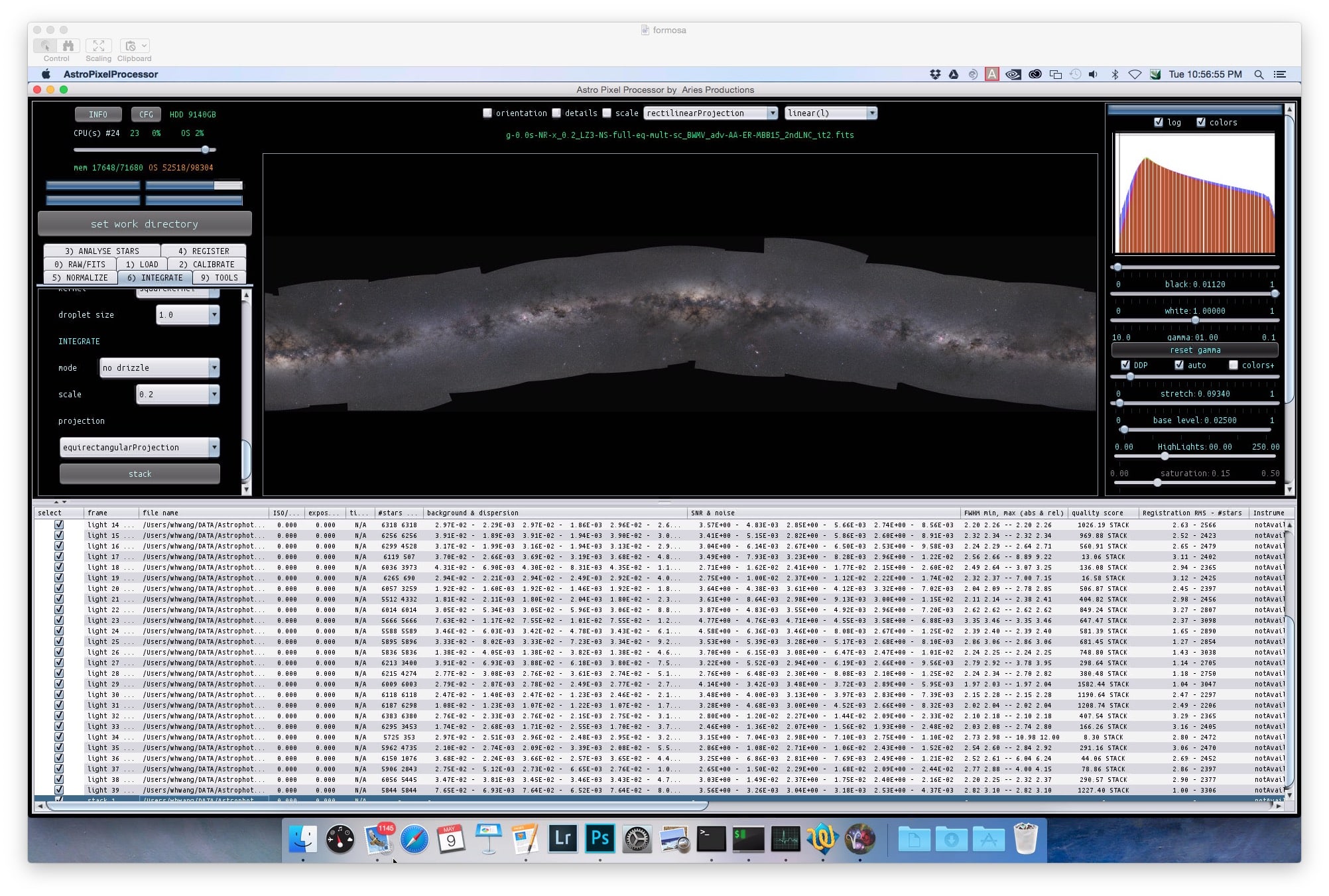
I finally am able to create a full mosaic using all panels without running into troubles. I used a scale of 0.2 to avoid potential errors. The result is attached. You can see that there are still issues:
1. The Milky Way is not straight. I guess this has something to do with who the reference is. Is it possible to make it straight in some way? None of the panels are perfectly at the middle of the Galactic plane. They are either above or below. So it is not possible to pick a reference frame that makes the projection right at the Galactic plane.
2. There are still brightness/contrast differences between the panels. I used multiply-scale for normalization. I can try if it becomes better if add-scale is used, but I guess not. I also used the advanced normalization.
3. The registration is wrong in many ways. As far as I recall, the various parameter I used are, calibrated projection, equirectangular, and dynamic distortion correction. Anything I can do to improve the registration?
Cheers,
Wei-Hao
 May 8, 2017 at 05:43 #15094Participant
A new kind of error message pops up. This time I tried to mosaic a subset of panels to see if I can avoid the out of memory error. Then I saw this new error message soon after I initiated the stacking procedure.
May 8, 2017 at 05:28 #15092ParticipantMore to report.
This time I used a different computer and allocated 80 GB of RAM to APP. It still shows an out of memory error. What’s funny is that I once successfully stitched all the panels together using a computer with just 16 GB of RAM. Then I couldn’t reproduce the success on the same computer and on the more RAM-rich computer: always out of memory. I believe the options I picked are different in different trials, but I can’t tell which option leads to the out of memory error.
Another potential bug. On this computer, I closed APP after the out of memory error. Then I launched it again. The RAM assigned to APP went back to 1 GB automatically, instead of 80 GB. This happened once on my other computer yesterday. It will be nice to force this setting unchanged every time, unless the users changes it.
Feature request: it will be nice if the “set work directory” button remembers the work directory from last time. At this moment, it goes to the home directory every time I launch APP and click the “set work directory” button. It will be much more convenient if it stays where it was. Even if we want to use a different work directory every time, going from where it was will still be faster than going from home, since astronomical files tend to sit in a more confined region in a big computer.
Finally, the launching time of APP on this second computer is just a few seconds, many many times faster than on the other computer. However, this computer is not faster than the previously one. It has more cores and much more RAM, but these shouldn’t affect how fast an app launches.
Cheers,
Wei-Hao
May 7, 2017 at 19:15 #15086ParticipantLooks like Registar can deal with both additive and multiplicative terms simultaneously. Unfortunately I have no idea how that was achieved. It can even handle images that are not linear. (It was produced during the film era.) So it may be doing more than simple multiplicative+additive calculations.
In my own data processing for large telescopes, I first subtract the background in all mosaic panels and make the background zero in all panels. This handles the additive term. Then I conduct aperture photometry on stars in the panels, and use the common stars in the overlapping region to adjust the brightness of the panels. This handles the multiplicative term. Unfortunately, this only works on images with primarily point-like objects and with images that are very well flattened. Amateur images are usually not like this, unfortunately.
In my naive imagination, one may try to use the histograms in the overlapping region between two panels, and match both the central locations and the widths of the histograms. The match of the central location is an additive term, and the match of the width is a multiplicative term. For this to work very well, the panels have to be well calibrated and linear. Noise may add to the width of the histogram, and it can confuse this process.
If you don’t mind sharing the method for the current multiplicative and additive adjustments in APP, I may be able to suggest a method or two that can do both simultaneously.
Cheers,
Wei-Hao
May 7, 2017 at 18:30 #15084ParticipantIdeally, we will need both additive and multiplicative. As you mentioned, the sky brightness can change with time during the night. So an additive term is needed. At the same time, a multiplicative term is also needed to account for the change in sky transparency, even if the photographer did not mix different ISO. And of course, in addition to mixing different ISO, it is also common for people to mix images of different exposure time. In this case, a multiplicative factor is also needed. So if at all possible, please consider an option that allows both an additive term and a multiplicative term.
May 7, 2017 at 16:38 #15076ParticipantI am still a bit confused by the difference between add-scale and multiply-scale. Let’s say the images were taken under different sky brightness (strong light pollution and less light pollution). So obviously there is a need for an additive term. Also, for some reason, the images were taken with different ISO. So a multiplicative term is also needed. In that case, which is the proper option to use?
Cheers,
Wei-Hao
May 7, 2017 at 15:01 #15070ParticipantLooks like equirectangular is more suitable for a Milky Way pano. I always hate to see a rectilinear projection. The distortion is just too severe.
The 2pi sky pano just cover half of the whole sky, or a hemisphere. Looks to me a fisheye or a stereographic projection would be more suitable.
Another question here. In the normalization page, one can choose to use “add” or “multiply” or “add-scale” or “multiply-scale”. Do you mind explaining their differences? I would think that scaling means multiplication, but it looks like they mean two different things here.
Cheers,
Wei-Hao
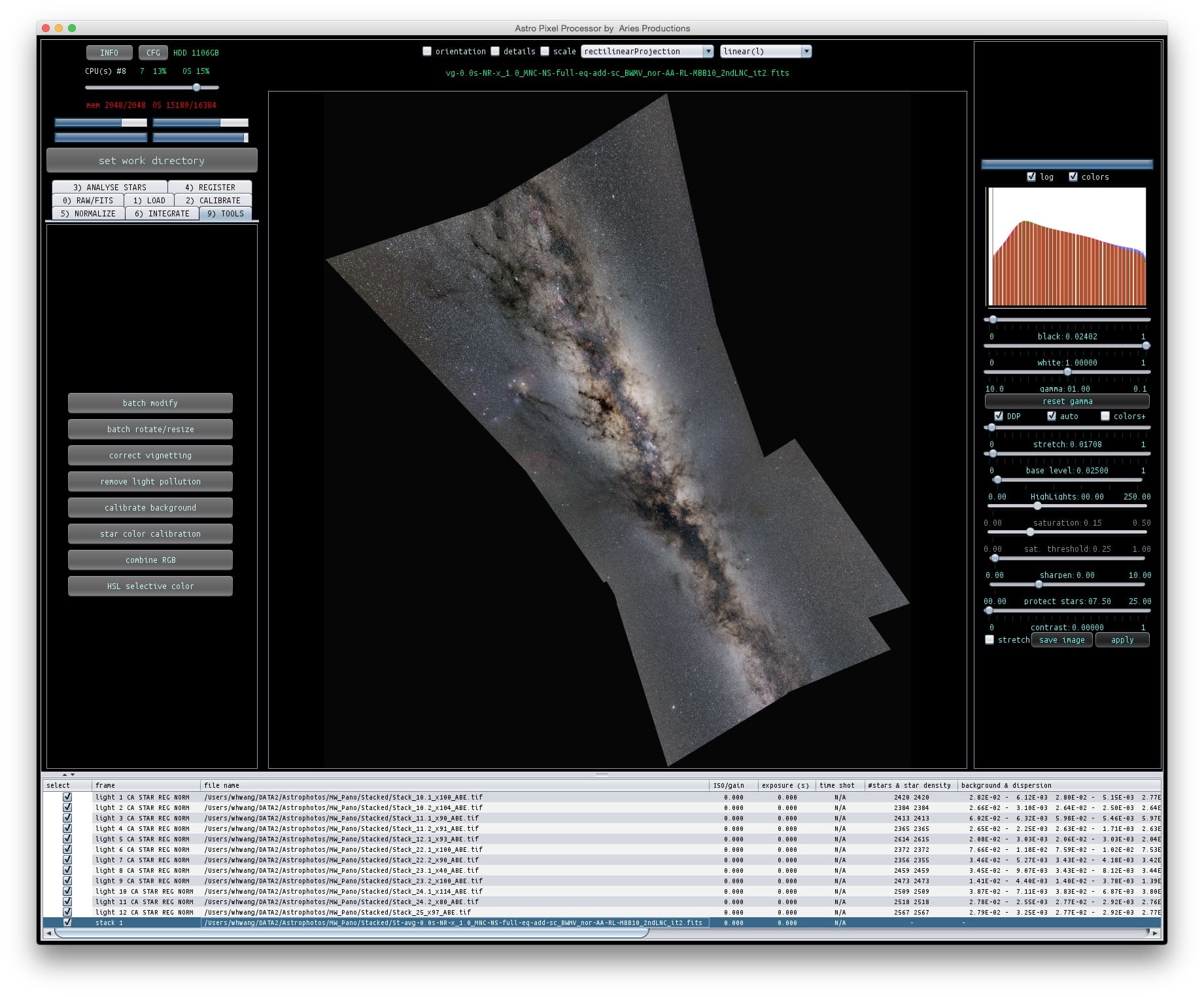
May 7, 2017 at 06:29 #15045ParticipantFor the orientation, now I can see why the image in the previous screen shot is tilted. Among all the panels, one is tilted relative to the Galactic plane, and that one happened to be picked by APP as the reference.
My OS is MacOS 10.10.5. The machine is a 3.4GHz i7 iMac with 16GB of RAM. The OS and apps are all stored in a 1TB-SSD*2 RAID0 external enclosure through a Thunderbolt2 connection. It’s not the fastest Mac, but still pretty fast especially for launching apps, because of the RAID0 SSD. To be clear, after I launch APP, its icon appears immediately, but it takes 2 to 3 minutes for the processing window to show up. Yesterday when I entered the license for the first time, it also took this long (or even longer) for the license activation. Because it took so long, I almost thought the activation failed.
Finally, will the equirectangular projection project the 2pi sky into a sphere or a rectangle?
Cheers,
Wei-Hao
May 6, 2017 at 19:01 #15034ParticipantHi Mabula,
I will try with your recommended parameters tomorrow. Here are a few additional related and unrelated points.
1. I believe I used equirectangularProjection instead of the standard rectlinearProjection. I might be wrong.
2. I also did try a small subset of the panels to start with. APP can process them successfully. Please see the attached image. Here, my question is whether I can control the orientation of the FOV, to be either horizontal or vertical. The tilted angle like this doesn’t look quite comfortable.
3. I believe what PI did for image stacking is to register every image to the reference frame. If all of the images are taken with identical optics, then the stacked result can be considered as having no distortion correction at all. It should have identical distortion pattern of the reference frame.
4. I have another project to mosaic the 2pi sky. Do you think either of the current two projection methods in APP can do that? When I started the project, I had fisheye projection in mind.
5. It takes couple of minutes for my computer to launch APP. This is more than 10x slower than any other programs I have. Is this normal?
Cheers,
Wei-Hao
 May 6, 2017 at 17:01 #15015Participant
This is the full screenshot when that error happened. The composition mode is indeed set to full. And yes, the mosaic is larger than 120 deg. It’s a 360-deg pano of the Milky Way.
-
AuthorPosts
