

@bula
active 4 years, 11 months agoForum Replies Created
-
AuthorPosts
-
HaverkampParticipant
Okay, so regular sigma rejection with 1 iteration LNC is faster than no LNC with Linear Fit rejection.
From the statistics of the stack I see a large boost in noise reduction compared to the previous stack ?
HDU1 – NOISE-1 = ‘ 3.27E-04’ / noise level of channel 1
HDU1 – NOISE-2 = ‘ 2.75E-04’ / noise level of channel 2
HDU1 – NOISE-3 = ‘ 4.09E-04’ / noise level of channel 3
HDU1 – SNR-1 = ‘ 1.28E+01’ / Signal to Noise Ratio of channel 1
HDU1 – SNR-2 = ‘ 1.44E+01’ / Signal to Noise Ratio of channel 2
HDU1 – SNR-3 = ‘ 1.45E+01’ / Signal to Noise Ratio of channel 3
HDU1 – medNR-1 = ‘ 8.42E+00’ / median noise reduction, channel 1
HDU1 – medNR-2 = ‘ 8.62E+00’ / median noise reduction, channel 2
HDU1 – medNR-3 = ‘ 8.79E+00’ / median noise reduction, channel 3
HDU1 – medENR-1= ‘ 1.60E+00’ / effective median noise reduction, channel 1
HDU1 – medENR-2= ‘ 1.92E+00’ / effective median noise reduction, channel 2
HDU1 – medENR-3= ‘ 2.86E+00’ / effective median noise reduction, channel 3
HDU1 – refNR-1 = ‘ 8.62E+00’ / reference noise reduction, channel 1
HDU1 – refNR-2 = ‘ 8.77E+00’ / reference noise reduction, channel 2
HDU1 – refNR-3 = ‘ 8.80E+00’ / reference noise reduction, channel 3
HDU1 – refENR-1= ‘ 1.68E+00’ / effective reference noise reduction, channel 1
HDU1 – refENR-2= ‘ 2.04E+00’ / effective reference noise reduction, channel 2
HDU1 – refENR-3= ‘ 2.99E+00’ / effective reference noise reduction, channel 3
HDU1 – LNC-DEG = ‘1st degree LNC’ / Local Normalization Correction degree
HDU1 – LNCRMS-1= ‘ 1.07E-04’ / Local Normalization Correction RMS of channel 1
HDU1 – LNCRMS-2= ‘ 7.28E-05’ / Local Normalization Correction RMS of channel 2
HDU1 – LNCRMS-3= ‘ 8.70E-05’ / Local Normalization Correction RMS of channel 3
HDU1 – LNC-ITER= 1 / Local Normalization Correction iterationsnoise reduction has improved from 6,?? to almost 9. So that is a huge improvement, have you noticed this when you compare this stack to the previous stack?
Assuming the old noise reducation was 6,5 and the new one is taken conservatively at 8,5, we have a 8,5/6,5 = 1.3 noise reduction between the stacks. So this stack is 30% less noisy ;-) that’s huge.
The LNC RMS are well below the noise values as well. That is a good sign.
HaverkampParticipantKees, I see your data in our dropbox, I you upload a couple of lights and a couple of flats, I’ll check what happens in calibration and if APP applies the masterbias frames to the light and flat frames.
HaverkampParticipantSame stack in DSS, PI and APP (Left as opened in PI, right with same autostretch applied [target background 0.12])
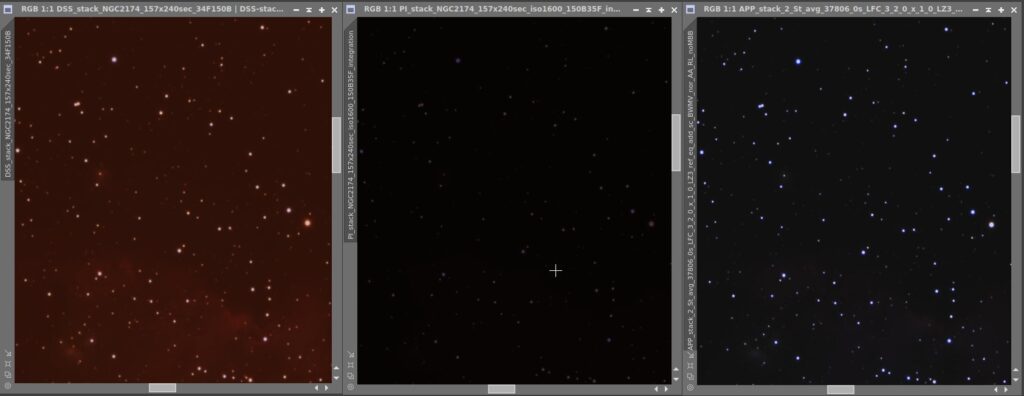
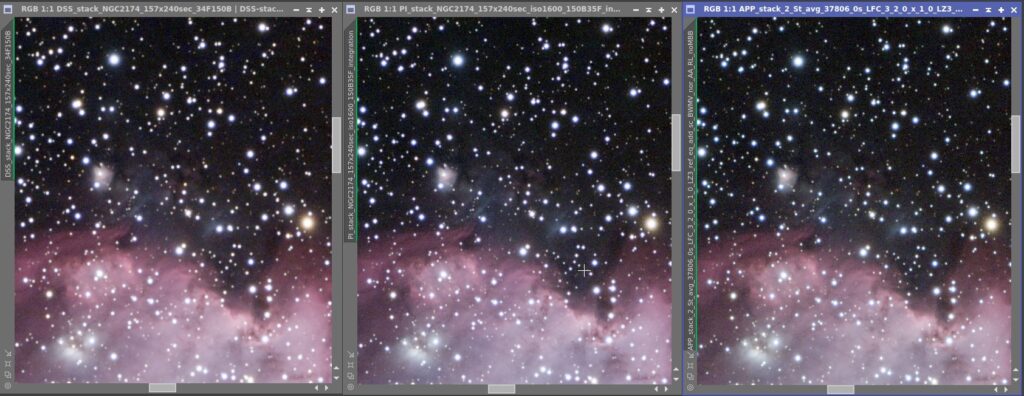
Hi Kees, please note, that these stacks possibly have different lokations and dispersions, so using a similar stretch with a target background of 0.12 can’t be considered good comparisons if you don’t normalize the data first.
HaverkampParticipantThank you @keesscherer,
“I am running the 8GB version on the 16GB machine. With sigma clipping. The time consuming step is 6, all the others were done in 3 hours.”
Okay, so the major bottleneck is the stacker currently… looking at the name of your stack, I think I’ll investigate the Linear Fit outlier rejection filter in APP. Possibly this becomes really slow in APP due to the regression that is done in each pixel stack to calculate linear fit parameters. The more frames you use the slower it becomes probably. So I’ll run some tests with that filter and compare it to the sigma and winsor filters. If this is the culprit, I’ll need to think of a smarter way to use this filter.
Having said this, I also notice you are using 3 iterations with kappa 2 (the default values currently). For 150 lights this would normally be way too aggresive for outlier rejection. I will set the default values to much more conservative settings in the next version ( 1 iteration kappa 3), since with stacks of 50 frames, usually in APP, this is all you need to reject all outliers. Probably, depending on implementation, the setttings that you need to use in different programs can be quite different due to different implementations of the calculation of statistical properties of the pixel stacks.
And this is probably good news for your Monkey Head stack, I am quite certain that with less clipping the stack will be much better when judged on noise and SNR.
In the FITS header of the stack (to be seen with details selectbox above image viewer), you’ll find stack statistics. the median and reference noise reduction are only 6 for a stack of 150 lights. If you have dithered your data, this is really low. Ideally, the reduction is the square of the number of lights. So for 100 frames, the best possible noise reduction is 10. So for 150 lights, the noise reduction could possible be doubled to 12 ;-). This is a clear sign to me that possibly the outlier rejection is way too aggresive.
”
I still don’t understand how i should handle the 200 iso flats, i loaded the lights 1600 iso, bias 1600 iso and 200 iso bias frames i selected sigma clippng and clicked stak on tab 6. But the flats still do not work ( i saw this :
” So your masterbias of iso200 for your flats and your masterbias of iso1600 for your lights will automatically be applied to the correct frames (that have the same ISO), since APP has the strict rule that master bias frames must match the iso of the frame that needs calibration.”)
so i must assume APP needs some other manual setting to work with the 2 sets of flats?”
I guess 2 sets of flats, would be 2 sets of bias?
I’ll make a calibration video with sound to show what should happen. There is no manual setting. APP should apply a master bias automatically to the frame needs calibration with the same ISO.
“All my systems work with a LAN only Teamviewer and i don’t like to change that setting.”
No problem, I’ll investigate the Linear Fit outlier rejection filter. I strongly suspect this is the problem.
Adding to this, I actually never use the Linear Fit filter. I consider it deprecated due to the implementation of LNC. A linear fit filter is a solution for conventional normalizaion of data where the gradients in the stack change clearly between the frames. Linear Fit can account for this and help with outlier rejction. But LNC will solve this automatically by correcting all subs in your stack for gradients before data integration. The concept of a Linear Fit filter then becomes deprecated and unadvisable. I’ll make work of this to explain this more thoroughly in the manual, since LNC is a new concept.
So my advise would be, try to stack your 150 lights with normal sigma clip 1 iteration, kappa 3 and LNC on 1 iteration first degree. I wouldn’t be surprised if the stack comes out much better ?
(I can also put it differenly: a linear fit filter is a solution for bad data normalisation, LNC solves this at it’s root by strongly improving data normalisation in your stack in the entire field of view and therefore a linear fit filter becomes useless and a normal sigma/winsor filter will suddenly work much better due to much better data normalisation.)
HaverkampParticipantOkay Tom, good to hear ;-)
“What do you mean by the RMS screen shot of the registration?”
After registration of the mosaic is finished, in the bottom file list window, there is a column with registration RMS and the #stars that were used in the registration. That information could help me in improving this. (Possibly, due to the amount of panels, the registration path to the reference becomes too long, but this is rather technical.. )
HaverkampParticipantAmazing… I don’t believe I experience this slow behaviour on Windows or Mac. So something fishy must be going on which causes this slow speed ;-(
Stacking 40 Canon 6D frames only takes about 21 minutes on my Windows 7 i7 930 quad core, (which is almost 7 years old).
Are you using the 4GB version on the machine with 8GB mem?
Are you running the stack with or without oulier rejection? If you are, turn it off and check if that has some influence? Do you know which part of 3)Calibrate to 6)Integrate has the longest duration?
Possibly the platform in which APP runs has a problem on your Linux Mint system, which I am unaware of at the moment. Maybe we could schedule a remote desktop/teamviewer session next week so I can have a look at how APP behaves on your system(s)?
Mabula
HaverkampParticipantHi @keesscherer, thank you,
So with more total frames, but still 9 hours… ;-( (but at least some improvement)
Were you using distortion correction in the registration proces or not?
(I noticed the dynamic distortion correction could take a very long time with more than 100 lights as well.)
April 3, 2017 at 11:44 in reply to: Het inregelen van QHY16200 CCD camera en Esprit 80 telescoop combinatie #13715HaverkampParticipantPrachtig @keesscherer, ik zie dat Holmberg IX boven M81 ook al zichtbaar wordt ;-)
HaverkampParticipantThank you @supernov ?
There is off course a big difference between
- images with lots of background and little or no nebulosity, like your recent M81/M82 data
- or data full of nebulosity
A correction is simple and quickly done in the first case, and that could be more or less automated.
But in the second case, you will need to work step by step, I’ll make a video showing this on difficult data with lots of nebulosity ?
One more tip, placing the select boxes evenly over the image helps, since each select box has a weight in the model calculation.
HaverkampParticipant1) @supernov, well it could be done, but then you will need to select this before you start the process, otherwise APP will need to wait for your location confirmation before it can continue. I’ll think about this.
2) Letting the software choose where to place the area select boxes is the same as setting you up for a bad result. The sample problem for good gradient correction is extremely!!! difficult and fraud with danger. I have discussed this recently with Wei-Hao Wang (professional astrophysicist). Currently there is no robust answer to do this using an automated process. And since it is fraud with danger, I will not implement this, because chances are much bigger that the results will be worse.
Personally, placing 30 select boxes only takes a couple of minutes, so I don’t consider this a real problem. And it is virtually impossible to place the select boxes correctly all at once in images with a lof nebulosity, let alone automating it…. You need to study the gradients and work towards an optimal solution.
The gradient/light-pollution correction is usually done on a stack of multiple frames. The gradients in the data are extremely complex due to this and simply can’t be perfectly described by simpel models. So letting the software place select boxes in areas with similar values like for instance your first select box is really ill advised. It won’t help at all in my opinion (i have tested this thoroughly). It will only contribute to more errors and a less optimal model.
Saving such a model is really no solution, since no model will be the same. If you make a light frame of 5 minutes exposure time. Then another one of 5 minutes exposure time on any given night, the gradients will already be different. Combining the 2 lights will have another model, and so one…
I do understand your ideas and suggestions, but the problem of getting a good gradient correction is so complex that automating this, like you propose, will only give rise to less optimal solutions, so I don’t see much value for it.
Personally, I wish for the best solution, and this can be achieved with some experience using the interactive remove LP tool in APP. I will try to make a movie with sound showing you how to use this tool and how you can work towards an optimal solution.
HaverkampParticipantYes, I totally agree with you on that @keesscherer.
I’ll try to make it work better on a 1366×768 screen ?
Possibly, APP shows some strange behaviour in this case as well, as you are describing.
I’ll make an extra note in the RFC list to test it myself on 1366×768.
April 1, 2017 at 22:45 in reply to: Calibration frames with different ISO settings, how to process? #13658HaverkampParticipant@srosenfraz, okay, that makes perfectly sense then ?
Providing dark scaling is on my todo list, but indeed, I would advise everyone to only take “short cuts” for previews or if no other option is available…
HaverkampParticipant@keesscherer, sorry but it is, it’s the minimum resolution of APP. It’s hard coded in the application at the moment so it’s pretty hard to be dishonest about this. See the screenshot.
The bottom file window probably doesn’t show because your OS can’t let APP work on a height of 768, due to reserved space for a OS task bar, or something else. I realize now, that I need to compensate for that. It’s on the RFC…
HaverkampParticipantOkee dan, ik geloof dat je M81/M82 WIP helemaal niet slecht is hoor, zal nu even naar je subs kijken die ik heb…
De achtergrond is wel in mijn optiek erg kunstmatig, veel te glad, maar dat is ook een kwestie van smaak natuurlijk.Ik zie graag juist nog een beetje korreligheid, het helpt vaak ook om de meest zwakke en kleine signalen zichtbaar te houden. Met enige vorm van ruisonderdrukking ben je die eigenlijk altijd kwijt.
Ruisonderdrukking beschouw ik als een last resort, alleen gebruiken/toepassen als het nodig is en je geen extra data meer gaat toevoegen en dan erg mild toepassen.
HaverkampParticipantZal ik vanavond even doen. Het is het meest prominente in de uiteindelijke stack, dan schrik je je een hoedje. Maar wellicht is dat ook omdat de uiteindelijke Stack in APP nogal gestretched is, dus dan zie je echt alles in de achtergrond. Als ik non-lineair ga dan verdwijnt eigenlijk alles wel. Op zich fijn, want dan ben je in feite de niet echt aanwezige achtergrond alleen maar beter aan het maken.
@supernov , misschien even ter verduidelijking. APP stretcht niks hoor aan je stack (doet alles lineair), je krijgt alleen een gestretchte preview. Het doel van een preview is , in mijn optiek, juist om een goed inzicht te krijgen in je data. De preview stretch is allerminst bedoeld om te dienen als de perfecte stretch van je data. De stretch die ik gebruik voor een uiteindelijke bewerking is eigenlijk altijd milder en ik speel met zwart punt, de base pedestal en de stretch zelf natuurlijk ;-) -
AuthorPosts