

@keesscherer
active 8 months agoForum Replies Created
-
AuthorPosts
-
KeesSchererParticipant
tested with 1 lightframe, that goes ok with analysing stars. When i test with 2 lightframes APP crashes, tested with different CR2 files.
KeesSchererParticipantI tested again with 3 lights, went to analyse stars, pressed “analyse stars” and at 27% progress bar APP crashes into never never land. No error message. I will test on my other Linux Mint laptop this afternoon.
KeesSchererParticipantBut how do I load the frames. Where do I select them? I don’t see any option to select the files (all .fit files in the g:\ directory).
Select the first, scroll to the last, keep the SHIFT key pressed and click on the last file.
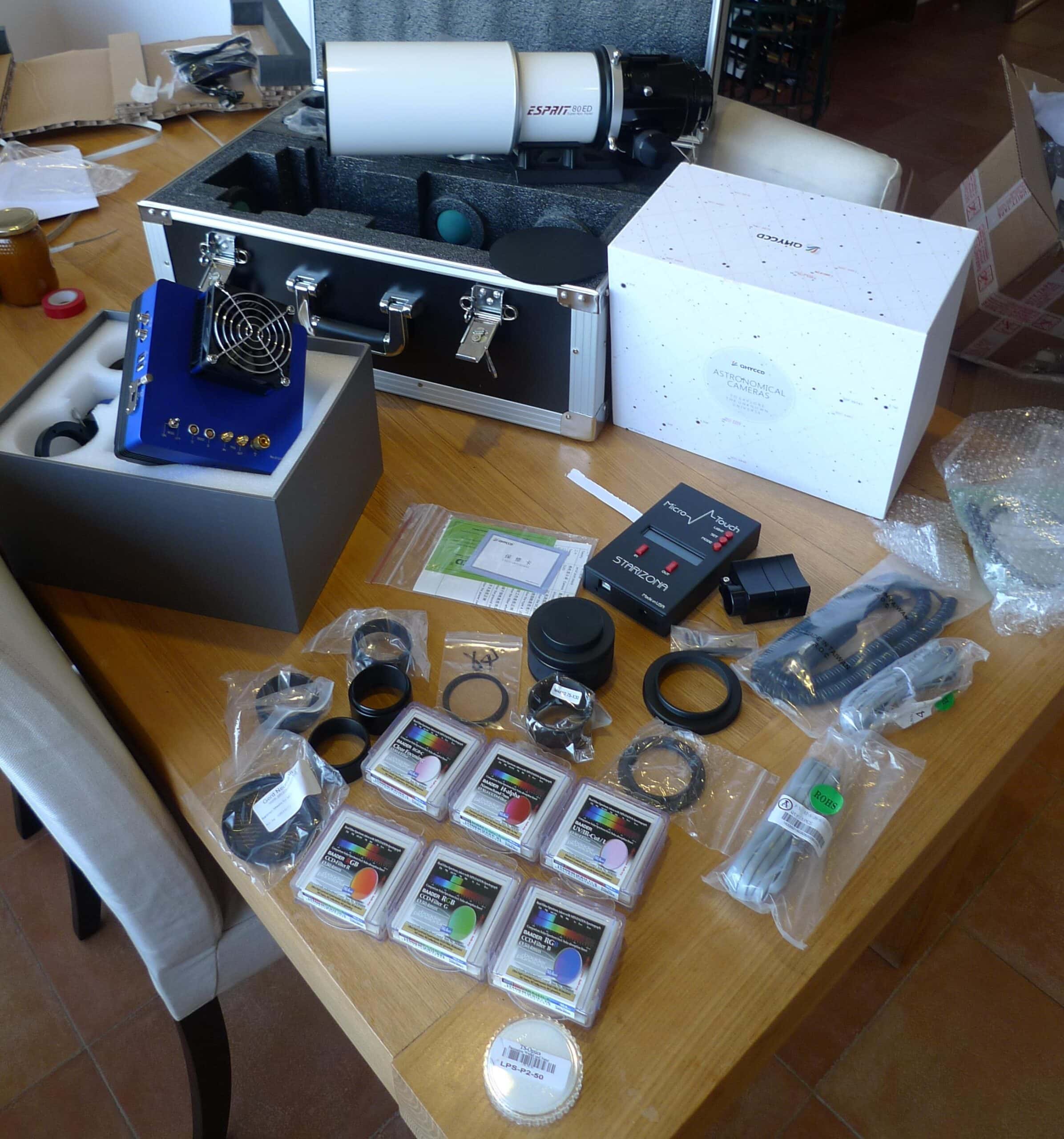
KeesSchererParticipantOh Mama! Alle onderdelen voor de extra Astrofoto setup zijn zojuist binnengekomen. (QHY16200, Filters,Esprit 80, Autofocusser en heel veel ringen en bussen)
Daar ben ik morgen wel even druk mee. Zoals altijd weer keurig verzorgd door Astromarket.
 KeesSchererParticipant
My SSD has 40 GB free space, i have my lights, flats and bias files on an external USB3 (1.5 TB) hard drive, so i can not stack 157 lights, 30 flats and 150 bias frames with this setup. I think you should clearly indicate the system requirements, to compare things, i can stack any number of lights, flats and bias in DeepSkyStacker with 4 GB RAM when there is enough external hard drive space. Maybe i should set the APP working directory pointing to the external drive?
KeesSchererParticipantsolved: version 1.033.1 activation works! (I installed the “DEB 8GB” version on Linux Mint KDE 17.0 64bit.)
KeesSchererParticipantIsn’t it possible to try installing the RPM package on your Linux Mint distro?
With some extra steps, yes, but i am testing the package that needs to be used on Debian/Ubuntu/Mint distro’s. The installation of the DEB package went fine, it is the activation that fails. I tried to verify the activation on a Windows 7 system, but there the installation hangs on the “creating shortcuts” and i had to reset the laptop……
KeesSchererParticipantWeer een hele vooruitgang hoor. Het was even zoeken, maar ik geloof dat dit de gegevens zijn die bij de opname horen, correct Arie? : Takahashi FS102 en de SX-35 met Ha Olll Sll en Lum filters. Voor elk filter ca 10 Subs van 120 sec.
March 14, 2017 at 16:27 in reply to: NGC2438, praktische vergelijking van afbeeldingsmaatstaf. #12539KeesSchererParticipantDe QHY16200 maakt gebruik van de KAF16200 sensor, net als de Atik16200 , de FLI16200, de Moravian16200 . Ik kan geen ASI ZWO aankondiging vinden voor een KAF16200 camera. Deze nieuwe, grote sensor zal naar verwachting de komende jaren een standaard worden en daarom is dit een mooi aanschafmoment. Mijn camera is per UPS Express naar mij onderweg.
March 13, 2017 at 12:40 in reply to: Komeet 41P-etc als test na ASCOM en SGP update bij volle maan #12533KeesSchererParticipantIk ben met de Scopedome PC heel terughoudend met updaten, Windows 7 al helemaal niet en voor deze update heb ik eerst een schijfimage gemaakt en daarna alles zo goed mogelijk getest want het is best complex al die verschillende software die foutloos moet samenwerken. Ik moest even denken aan de Apollo Computers, heel simpel en heeeeel betrouwbaar.
KeesSchererParticipantwaarmee ik mijn LPF-filter erop kan schroeven. omdat de maan toch best zal storen vanavond ben ik geneigd om dit filter erop te zetten en te kijken wat voor verschil dit gaat maken.
Een maanspectrum is dusdanig continue dat een LPF filter daarvoor geen verschil zal maken.
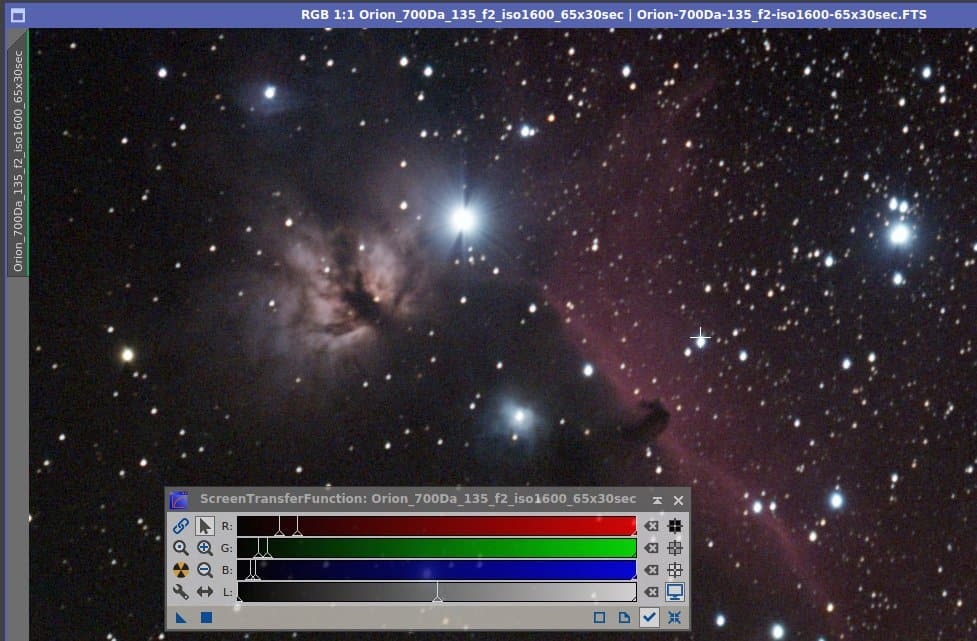
KeesSchererParticipantDit is zoals mijn Samyang 135mm f2 lens Alnitak weergeeft, en dat is het effect waar Marc het over heeft. Maar met een M48 filter voor de lens schiet je op f2.8 dus dan heb je er geen last meer van. (Maar je hebt ook geen f2 meer natuurlijk)
 KeesSchererParticipant
Ik bedoel (en zeg) de brandpuntsafstand.
KeesSchererParticipant(tamron 600mm, Orion 70mm volgkijker). Hopelijk gaat dat werken met webcam/phd guiding zodat ik van die periodic error in die AS afkom.
Oei, dan ben je met een APS-C sensor (Canon 550D) en een 600mm lens aan het werk op een SA? Dat lijkt mij een beetje te veel, 200mm tot 300mm op full frame sensor is de grens lees ik overal.
KeesSchererParticipantHallo Kees, die webcam is een logitech c270 die ik destijds van een nosepiece heb voorzien en ook eens heb uitgeprobeerd op mijn neq6-pro icm phd2 en dat werkte met instelling windows webcam in phd. Mijn enige zorg is of (en met welke instellingen in phd) de SA wel aan te sturen is. Ik kan op internet geen enkele melding van deze configuratie of de in te stellen parms in phd vinden.
De Logitech c270 heeft pixels van 2.8 micron, dat voer je in onder advanced setup (Hersen symbool) , camera. Voor de camera gain setting moet je ‘s nachts testen met een sterbeeld maar start eens op 90. Onder het guiding tabblad moet je de brandpuntsafstand van de GUIDEscope invieren. Onder het Algolrithms tabblad bij “declination” moet je “none” selecteren, en verder startwaarden zoals in het guidingartikel hier op starry-night.nl:
PHD2 – Autoguiding deel 1, basis snelstartgids.
PHD2 – Autoguiding deel 2, optimaliseren.
-
AuthorPosts